Form Webhook Integration: Route Submissions to External Apps
Form submissions sitting idle in your system create friction. The form automation market reached $16.6 billion in 2025 and is forecast to grow to $74 billion by 2034—a clear signal that teams are tired of manual data movement. Without webhook integration, teams copy-paste submission data between systems, trigger CRM entries manually, or build custom backend infrastructure just to connect forms to external apps. The result? Delays in lead response, duplicate data entry, and wasted engineering time.
Webhook integration is the production-ready solution. A webhook automatically routes form submissions to external applications—CRMs, spreadsheets, payment processors, AI pipelines, messaging tools—the moment a user submits. No backend code required. No polling loops. No manual handoffs. Just one form, one endpoint, and instant data flow to wherever your business logic lives.
Key Takeaways
- Webhook-triggered form automation is the fastest integration pattern for real-time event-driven workflows, with customer data showing 2–3x growth in webhook adoption in 2025 (Buildform, viaSocket, 2026)
- Teams choosing webhooks over custom backends save engineering time and reduce infrastructure maintenance—critical for indie developers and small teams without DevOps resources
- Proper webhook setup requires signature verification, retry logic, and idempotency handling to ensure reliable, duplicate-free delivery to external systems
- Real-time Event Delivery: Webhooks push form submissions to external systems instantly upon submission, eliminating manual data syncing and batch delays.
- No Backend Infrastructure: Route submissions directly to third-party APIs without building servers, databases, or custom code—critical for static site developers and indie builders.
- Flexible Routing Logic: Map form fields to external app endpoints, choose HTTP methods (POST, PUT, GET), and conditionally trigger webhooks based on form data.
- Integration Reliability: Implement retry policies, signature verification, and error logs to guarantee submissions reach their destination reliably.
- Popular Webhook Destinations: Connect forms to Airtable, Slack, n8n, Zapier, CRM platforms, and custom APIs in minutes—no vendor lock-in required.
What Is Form Webhook Integration and Why It Matters
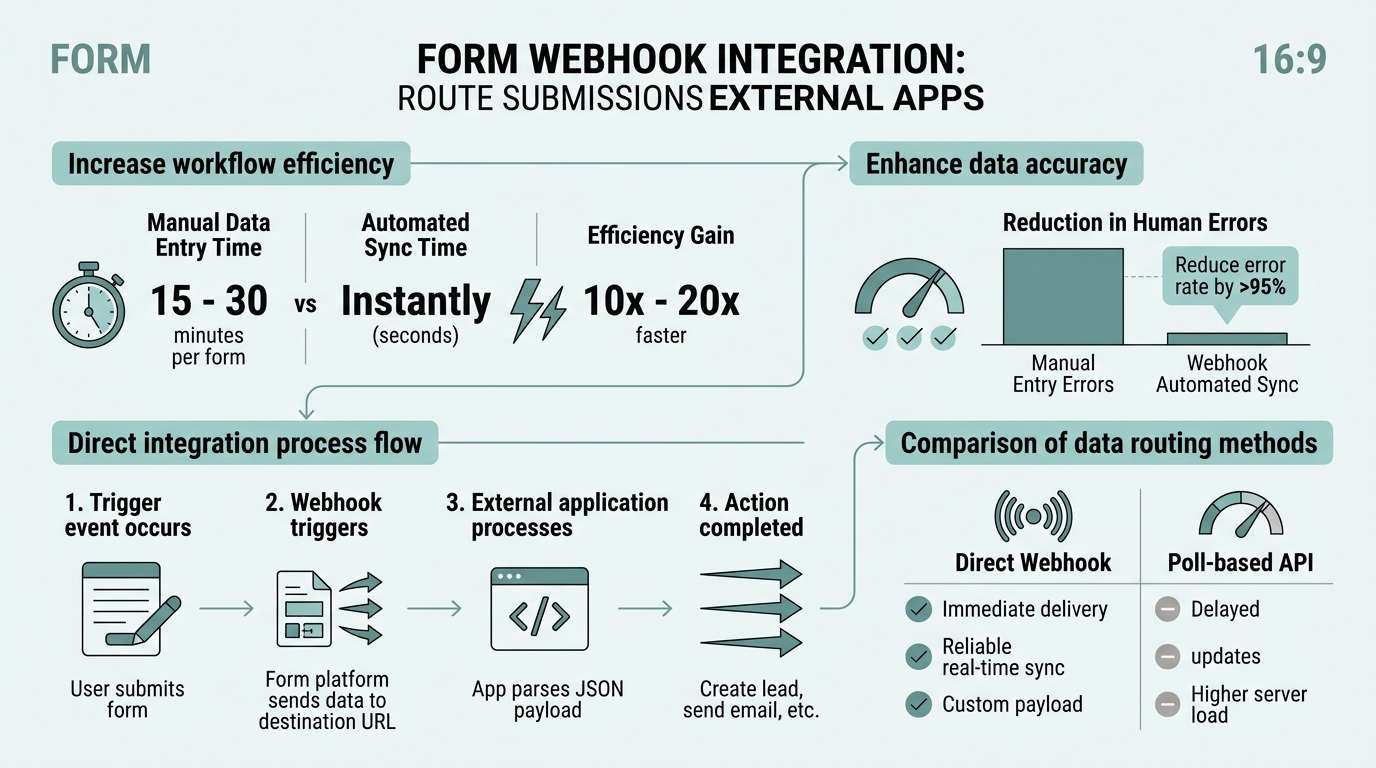
A webhook is an HTTP callback that sends form submission data to an external URL the moment a user hits submit. Unlike polling (checking for new data repeatedly) or native integrations (locked to one platform), webhooks are push-based, event-driven, and universally compatible. A 2026 industry analysis confirms that webhooks remain the best pattern for fast, event-driven form submissions to external systems, with GitHub, Stripe, Twilio, and Calendly all built on them.
"Webhooks are the only reasonable integration choice for real-time form automation. They push data instantly, avoid rate limits, and work with any HTTP-compatible service—making them ideal for teams that need forms without backend infrastructure."
For indie developers building static sites with React, Vue, Next.js, or plain HTML, webhooks solve a fundamental problem: forms need a backend to function, but you don't want to maintain one. Traditional alternatives—custom Node.js servers, AWS Lambda, Firebase functions—add complexity, DevOps overhead, and ongoing maintenance. Buildform's 2026 guidance shows that webhooks are strongest for event-driven pushes, making them ideal for teams who want forms that just work.
Webhooks eliminate data silos. Instead of form submissions ending up trapped in a dashboard, they flow directly into your CRM, spreadsheet, Slack channel, or custom workflow. Lead data reaches sales in seconds. Support tickets auto-create in your issue tracker. Payment confirmations trigger email workflows instantly. No middleware. No manual steps. Just submission → webhook → external app.
Key Differences: Webhooks vs. APIs vs. Native Integrations
Understanding when to use webhooks matters. Webhooks are one-way, event-driven pushes—perfect for "send this data somewhere immediately." APIs are two-way conversations—better when you need to query data back, validate before storing, or run complex logic. Native integrations are pre-built connectors—fastest to launch but locked to one platform.
| Integration Type | Best Use Case | Speed to Launch | Flexibility | Maintenance |
|---|---|---|---|---|
| Webhooks | Real-time form submission routing to external apps | Minutes (single URL endpoint) | High (works with any HTTP-compatible service) | Low (no backend code needed) |
| APIs | Custom validation logic, two-way data sync, complex workflows | Hours to days (requires backend) | Very High (full control) | High (ongoing backend maintenance) |
| Native Integrations | Quick deployment with pre-selected platforms (Zapier, Airtable, Slack) | Minutes (pre-built connections) | Medium (limited to vendor's supported features) | Low (vendor maintains integration) |
| FormBeam | Production-ready webhook forms for static sites, indie developers, small teams | Minutes (embed one line of HTML, configure webhook URL) | High (POST/PUT to any HTTP endpoint, custom field mapping) | Very Low (fully managed backend, no infrastructure, built-in retry and logs) |
FormBeam is built specifically for this use case. It handles form submissions on behalf of static site developers, stores them in a dashboard, and pushes them to external apps via webhook—all without requiring a backend. Teams configure a destination URL, map form fields, choose an HTTP method, and submission data starts flowing automatically.
Why Webhooks Have Become the Preferred Integration Pattern
Webhook adoption grew 2–3x through 2025, according to industry data from platforms like Customer.io. Why? Real-time is now table-stakes. Sales teams expect leads in their CRM within seconds, not hours. Support systems expect tickets auto-created on submission. Automation platforms like Zapier and n8n use webhooks as their primary trigger mechanism for downstream actions.
"Real-time webhook delivery is now the baseline expectation. Teams that still manually copy data between systems or wait hours for batch syncs lose competitive advantage—webhooks push form data instantly, giving sales and support teams immediate visibility into new submissions."
Webhooks also avoid the "API rate limit" problem. APIs often limit how frequently you can query for new submissions. Webhooks push data to you immediately—no polling, no delays, no wasted API calls. For forms handling high submission volume or time-sensitive use cases (lead qualification, payment processing, real-time notifications), webhooks are the only reasonable choice.
How Webhook Form Submission Routing Works
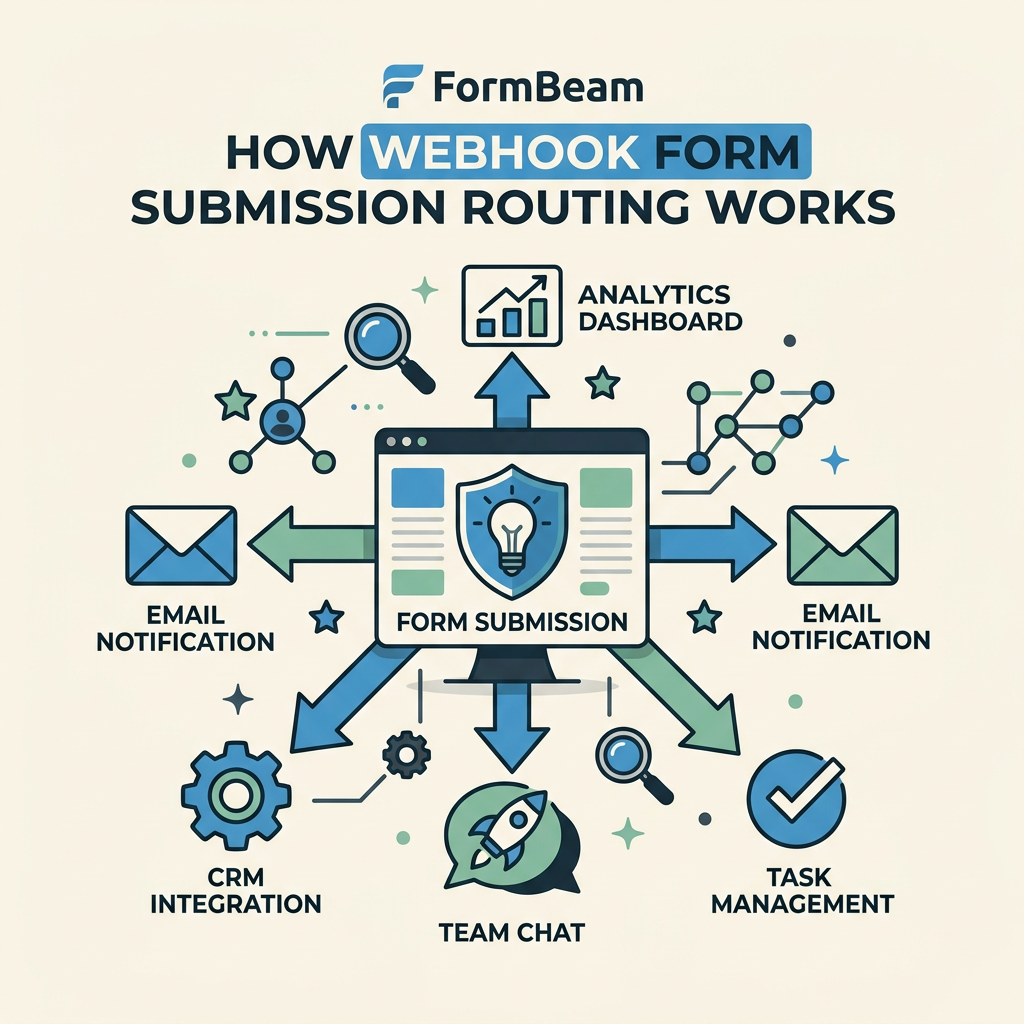
The mechanics are straightforward but worth understanding. When a user fills out and submits a form, the form service (your form platform, a tool like FormBeam, or your custom backend) captures the data and makes an HTTP POST or PUT request to a pre-configured webhook URL you own or manage. That URL is an endpoint—either in your app, a third-party service, or a workflow automation platform.
The external app receives the form data as JSON, processes it, and responds with a success or error status. If the webhook fails—network timeout, server error, invalid data format—a properly configured system will retry automatically. This is critical for reliability.
The Webhook Flow: Step by Step
- User submits form: HTML form submission (POST) or JavaScript form.submit() triggers on the client side.
- Form service captures data: Your form backend (FormBeam, Fillout, Formstack, etc.) receives submission and validates it.
- Webhook HTTP request: Form service immediately sends an HTTP POST/PUT to your configured webhook URL with submission data as JSON payload.
- External app processes data: Your webhook receiver (API endpoint, Airtable, Zapier, n8n, CRM, Slack bot) receives the JSON, processes it, and returns a 2xx status code on success.
- Retry on failure: If the webhook fails, a retry mechanism (typically 3–5 attempts with exponential backoff) re-sends the request until it succeeds or hits a retry limit.
- Logging and audit trail: The form service logs all webhook attempts—successes, failures, retries—so you can debug issues and confirm delivery.
Configuring Webhook Fields and Payload Mapping
Not every form field needs to go to every external system. Modern form platforms let you map fields conditionally. For example, if you have a contact form with email, phone, and message, you might want to send only email and message to your CRM, but send email and phone to your SMS marketing platform. Field mapping handles this.
A typical webhook payload for a contact form looks like this (in JSON):
Example payload sent to webhook URL:
- email: user@example.com
- name: John Doe
- message: "I'd like to discuss pricing"
- submission_id: abc123
- timestamp: 2026-05-30T14:32:00Z
Your webhook receiver parses this JSON, extracts the fields it needs, and takes action—creates a Airtable row, posts to Slack, adds a contact to your CRM, triggers a workflow. The key advantage: you define the mapping once, and every future submission follows the same path.
Popular Webhook Destinations for Form Submissions

The power of webhooks is flexibility. You're not locked into a pre-built integration ecosystem. Instead, you can route form data to any service that accepts HTTP POST requests. Here are the most common destinations developers and small teams use with webhook-enabled forms.
CRM and Lead Management Systems
The most common webhook destination is a CRM. When a contact form is submitted, the webhook creates a lead or contact record automatically. This eliminates the "lead lost between contact and CRM" problem. Platforms like HubSpot, Pipedrive, and Salesforce expose REST APIs that accept webhook payloads.
A typical setup: form submission → webhook POST to CRM API → new lead record created with name, email, phone, and custom fields mapped directly from the form. Sales reps see new leads in their dashboard within seconds.
Spreadsheets and Data Warehouses
Not every team uses a CRM. Many small businesses and freelancers track submissions in Airtable, Google Sheets, or Notion. Airtable's REST API accepts webhook payloads and auto-creates table rows. Google Sheets requires either a Google Apps Script webhook receiver or a third-party integrator like Zapier. This approach keeps submission records organized without infrastructure.
Workflow Automation Platforms
Zapier and n8n are workflow engines. They accept webhooks as triggers and execute multi-step automations. A single form submission can trigger a sequence: save to CRM → send Slack notification → create calendar event → send confirmation email. Webhooks are the entry point for these automations. Contact Form 7 remained the most-used form builder trigger in 2025 at 32.27% across Zapier-like platforms, showing that webhook-connected forms are central to automation workflows.
Messaging and Notification Systems
Slack, Discord, and email services also accept webhooks. A form submission can trigger a Slack message to your team immediately—ideal for time-sensitive submissions like support requests, urgent inquiries, or high-value leads. You configure the Slack webhook URL once, and every form submission posts directly to a channel.
Custom Applications and Microservices
If you have a custom backend service, a Node.js API, or a serverless function, webhooks integrate seamlessly. Your form submission becomes an event that triggers your own business logic—database writes, complex validation, third-party API calls, machine learning inference, file processing.
Best Practices for Reliable Webhook Form Integration

Webhook reliability isn't automatic. A poorly configured webhook can lose data, create duplicates, or fail silently. Here's how to implement webhooks that actually work in production.
Signature Verification and Security
Webhooks are HTTP requests sent over the internet. Anyone who guesses your webhook URL could send fake form submissions. Production webhook receivers must verify that incoming requests actually came from your form platform, not an attacker. This is done with cryptographic signatures.
"Always verify webhook signatures before processing form data. Your form platform signs each webhook request with a secret key, adding a signature header to the HTTP request. Your receiver validates the signature using the same key. If the signature doesn't match, reject the request immediately—this prevents spoofing and ensures only legitimate form submissions are processed."
Your form platform signs each webhook request with a secret key, adding a signature header to the HTTP request. Your webhook receiver validates the signature before processing the data. If the signature doesn't match, you reject the request immediately. This prevents spoofing and ensures only legitimate form submissions are processed.
Retry Logic and Exponential Backoff
Networks fail. The external app might be temporarily down. Retry logic automatically re-sends failed webhooks—typically up to 5 attempts over several hours. Exponential backoff spreads retries out (first attempt immediately, second after 1 second, third after 10 seconds, etc.) to avoid overwhelming a recovering service.
A robust webhook system retries failed requests at least 3 times before giving up. If a submission fails even after retries, it's logged as a failed delivery so you can investigate and manually re-send if needed.
Idempotency Keys to Prevent Duplicate Processing
Retries can create duplicates. If a webhook succeeds but your service doesn't receive the success response (network glitch), the form platform retries. Your webhook receiver receives the same submission twice. Without protection, this creates two CRM leads, two Airtable rows, two Slack messages.
The solution: idempotency keys. Every webhook includes a unique ID (submission_id). Your webhook receiver stores this ID and rejects duplicate requests with the same ID. Process the first request, store the ID, and subsequent requests with the same ID are skipped. This ensures reliability without data duplication.
Delivery Logs and Debugging
When a webhook fails, you need visibility. A production form platform logs every webhook attempt—URL, HTTP method, headers, payload, response status, timestamp, and error message if it failed. These logs let you debug configuration issues, see which submissions succeeded versus failed, and replay failed requests manually.
Tools like FormBeam's dashboard show detailed submission logs and webhook delivery status, making it easy to confirm which submissions reached their destination and which are stuck.
Testing Webhooks Before Production
The worst time to discover a webhook configuration error is after you've launched your form. Test end-to-end before traffic starts. Send a test submission, confirm it reaches your external app, verify the fields are mapped correctly, and check the response. If anything is wrong, fix it. Only then enable the webhook for production traffic.
Common testing mistakes: using the wrong HTTP method (GET instead of POST), wrong URL, missing required fields, incorrect field names, or mismatched authentication headers. A single test submission surfaces all of these before real users hit problems.
Implementing Form Webhooks Across Different Tech Stacks
Webhook setup varies depending on your form platform and destination. Let's cover the most common scenarios indie developers and small teams encounter.
Webhooks in Static Site Builders (HTML, React, Vue, Next.js)
Static sites don't have a backend server, so you need a form service. A platform like FormBeam handles form submissions on your behalf and routes them via webhook. You embed a single line of HTML in your form, configure your webhook URL in the FormBeam dashboard, and submissions flow automatically to your external app. No custom code required.
React, Vue, and Next.js developers can use the same approach—FormBeam or Fillout captures submissions, webhooks handle routing. Alternatively, you can use a framework-specific form library (like React Hook Form) combined with a serverless function to receive webhook payloads and forward them to external systems. Either way, webhooks are the routing layer.
WordPress Forms and Webhooks
WordPress users have native form plugins like Gravity Forms, Contact Form 7, and WPForms. All support webhooks natively or via extensions. You configure the webhook URL in the form settings, test with a submission, and watch data flow to your external system. WordPress also integrates with Zapier, making webhook routing to hundreds of third-party apps straightforward.
Custom Backend Services and Webhook Receivers
If you're building a custom backend (Node.js, Python, Go, whatever), you need to expose an HTTP endpoint that accepts POST requests. That endpoint is your webhook receiver. Parse the JSON, validate it, process it, and return a 200 status. The form platform will retry if you don't return a success status, so be reliable.
Example Node.js webhook receiver:
- Listen on POST /webhook/form-submission
- Parse incoming JSON body (email, name, message, etc.)
- Validate signature header matches your secret key
- Store in database or call external API
- Return 200 OK if successful
- Return 5xx or timeout if failed (triggers retry)
Serverless functions (AWS Lambda, Vercel Functions, Netlify Functions) work the same way. They're webhook receivers—stateless functions that process incoming webhooks and return a response. This approach scales automatically and costs very little since you only pay when a form is submitted.
Troubleshooting Common Webhook Integration Issues
Webhooks fail in predictable ways. Here's how to diagnose and fix them quickly.
Webhook Not Triggering or Reaching Destination
First, check the basics: Is the webhook URL correct? Is the destination service online and accepting requests? Does the destination service require authentication headers? If the webhook is configured but no data is arriving, check the form platform's delivery logs. Most platforms show the HTTP response status and error message—404 (not found), 401 (unauthorized), 500 (server error), timeout, etc. The error message usually points directly to the problem.
Common culprits: wrong URL, mistyped endpoint, firewall blocking the request, authentication failure, or the destination service being offline. Fix one of these, and the webhook usually starts working.
Wrong Data or Missing Fields in Webhook Payload
If the webhook reaches the destination but the fields are wrong, it's likely a field mapping issue. Your form has fields (email, name, phone), but the webhook might be sending them under different names (user_email, full_name, contact_phone). Check the form platform's field mapping—ensure each form field is mapped to the correct external field name.
Some platforms auto-detect field names; others require manual mapping. Take time to verify the mapping before launching.
Duplicate Submissions or Data
Duplicate submissions usually mean your webhook receiver isn't implementing idempotency. If the same submission_id is processed twice, your system should skip it. Implement a check: before processing, query your database for a record with that submission_id. If it exists, skip processing and return 200 (don't retry). This prevents duplicates even when webhooks are retried.
Webhook Failures After Deployment or Platform Changes
If webhooks suddenly fail after you deploy new code or change your form platform, the cause is usually a breaking change in the webhook payload format or a misconfigured authentication header. Test a webhook manually with curl or Postman to confirm the exact payload and headers being sent. Compare against your receiver code. Most mismatches are found this way.
Conclusion
Form webhook integration is the modern standard for connecting form submissions to external systems without backend infrastructure. The form automation market is projected to grow 18% annually through 2034, driven largely by webhook adoption and real-time integration demand. Teams that implement webhooks eliminate manual data movement, reduce lead response time, and avoid building backend servers just to handle forms.
The best path for indie developers and small teams is a managed form platform like FormBeam that handles form storage, validation, and webhook routing in one service. You avoid infrastructure maintenance, get built-in retry logic and delivery logs, and can configure webhooks in minutes. If you're building static sites without a backend, webhooks are non-negotiable—they're the only practical way to route form data to external apps reliably.
Try FormBeam and set up your first webhook form in under 5 minutes. No credit card required. Free tier includes 100 submissions monthly with full webhook support, delivery logs, and dashboard access. See how webhooks simplify form automation.
FAQs
How do webhooks send form data in real time?
Webhooks are HTTP requests your form platform sends immediately after a submission is received. When a user submits a form, your form service captures the data and makes a POST request to your webhook URL (an endpoint you configure). That endpoint receives the form data as JSON, processes it, and returns a success or error status. Because webhooks are push-based, data arrives instantly—no polling or delays. This is why webhooks are the preferred pattern for real-time form integration, especially for use cases like lead routing to CRMs, Slack notifications, or time-sensitive automations where seconds matter.
What's the simplest way to set up form webhooks without building a backend?
Use a managed form platform that handles webhooks for you. Services like FormBeam simplify webhook setup by providing a dashboard where you paste your webhook URL and configure field mapping—no backend code required. You embed one line of HTML in your form, configure the destination URL in the platform's settings, and form submissions flow automatically to your external app. This approach eliminates the need to build or maintain a form backend server, making it ideal for indie developers and small teams building static sites. The platform handles storage, retry logic, and logging behind the scenes.
What happens if a webhook fails to deliver a form submission?
A well-configured webhook system retries failed requests automatically. When a webhook POST fails (network timeout, server error, 5xx response), the form platform waits and re-sends the request up to 5 times over several hours using exponential backoff. If all retries fail, the submission is marked as failed and logged so you can investigate and manually re-send if needed. To prevent duplicates during retries, your webhook receiver should check for duplicate submission IDs before processing—if it sees the same ID twice, it skips processing and returns success. This combination of retry logic and idempotency ensures reliable delivery without data duplication.