GDPR Form Compliance Checklist for Static Websites
GDPR enforcement reached unprecedented scale in 2025, with €1.2 billion in fines issued and 443 breach notifications logged per day across the EU. For indie developers and small teams managing static websites, the risk is especially acute: form submissions are the primary touchpoint where personal data enters your ecosystem, and a single compliance gap can trigger audits, warnings, or penalties. The complexity multiplies when you're juggling HTML, React, Vue, or Next.js without backend infrastructure to enforce data protection by default.
Most indie developers inherit form handling from templates or plugin defaults, never realizing they've created a compliance liability. This checklist strips away the regulatory jargon and gives you a practical, step-by-step framework to audit your forms, lock down data handling, and prove compliance if an authority comes calling.
Key Takeaways
- €1.2 billion in GDPR fines issued in 2025, with enforcement up 22% year-over-year—making form compliance critical even for small sites (Kiteworks, 2026).
- Most common violation: insufficient technical and organizational security measures, responsible for 29% of all fines in 2025.
- Static website forms require explicit opt-in consent, transparent privacy notices, and timestamped consent logs to pass authority audits.
- Establish Lawful Basis for Processing: Define and document which GDPR articles justify collecting each form field; explicit consent is required unless contractual necessity applies.
- Obtain and Log Explicit Consent: Implement affirmative opt-in (not pre-checked boxes), separate consent from terms, and capture timestamped proof for every submission.
- Implement Transparent Privacy Notices: Display inline privacy disclosures near forms and link to your full Data Protection Impact Assessment; clarity prevents vague processing claims.
- Secure Form Data in Transit and at Rest: Encrypt submissions, use HTTPS-only endpoints, and store data on GDPR-compliant processors with Data Processing Agreements in place.
- Audit and Monitor Form Behavior: Scan your static site for unauthorized scripts, third-party pixels, or hidden fields collecting data without consent.
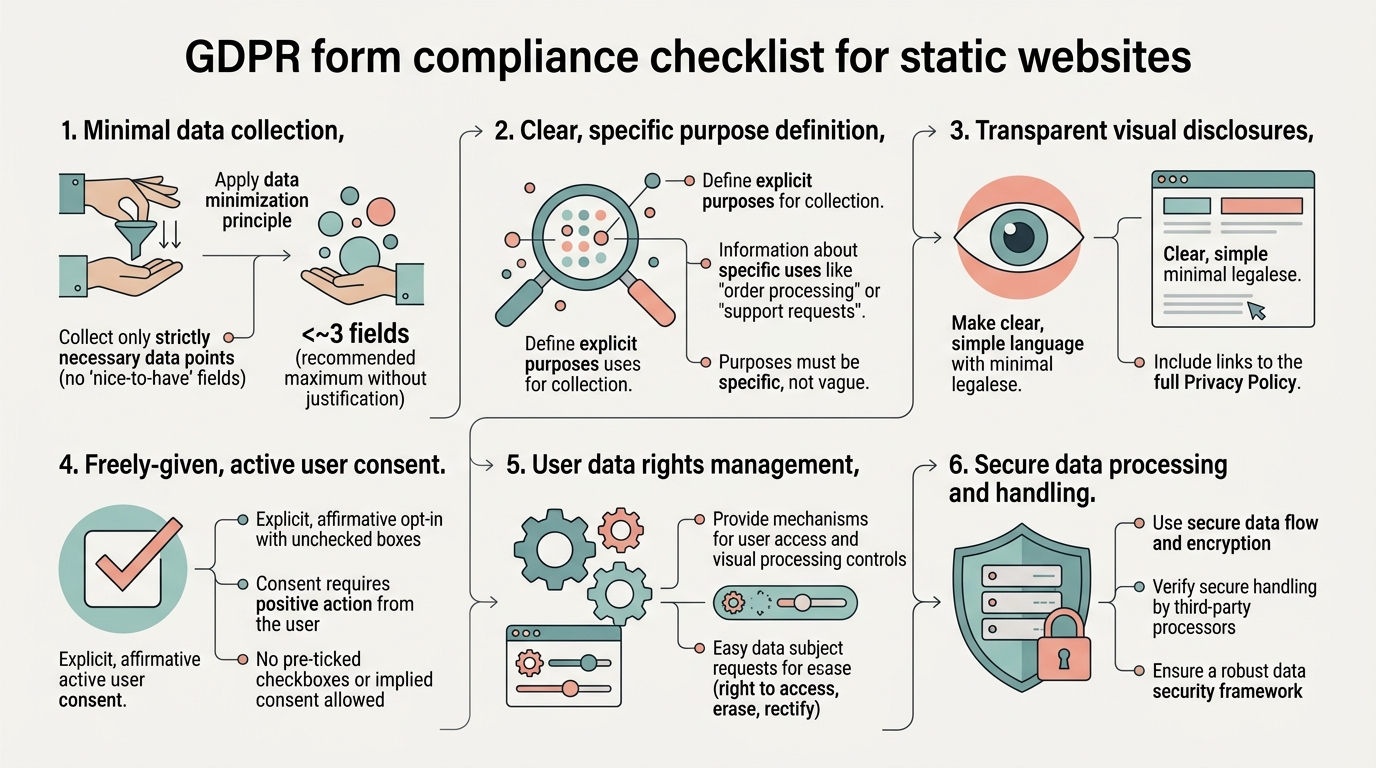
Why Static Website Forms Are a Compliance Hotspot
Static websites—HTML, React, Vue, Next.js, Svelte, and similar frameworks—lack built-in backend governance. Your form lives in the browser, disconnected from the business logic that would typically enforce consent checks, data retention policies, or encryption. This architectural gap creates three high-risk scenarios: form submissions may route through multiple third-party processors before reaching your server; scripts and pixels from analytics or marketing platforms may fire without explicit user consent; and consent proof is difficult to timestamp and retrieve during audits.
"70% of websites experience 'GDPR compliance drift' from unmonitored scripts and plugins collecting data without consent. For static site developers who rarely touch the backend, consent drift goes undetected until an authority investigation begins."
The financial stakes are stark. GDPR fines have reached €7.1 billion cumulatively, with over €20 million in maximum penalties per violation for the most serious breaches. Small teams cannot absorb these costs, and insurance rarely covers negligence.
Step 1: Define and Document Your Lawful Basis

Before a single form field appears on your site, you must establish which GDPR article justifies collecting that data. This is foundational: every field you collect must have a documented legal basis, and if you cannot name one, you have no right to process it.
Mapping Personal Data Fields to GDPR Articles
GDPR Article 6 lists six lawful bases for processing. For static website forms, the two most relevant are:
- Article 6(1)(a) – Consent: The user explicitly opts in to data processing. This requires affirmative action (checkbox ticked, button clicked) and is the safest choice when you have no contractual relationship with the user. Most contact forms, surveys, and newsletter signups fall here.
- Article 6(1)(b) – Contractual Necessity: You collect data because the user has asked for a service that requires it (e.g., shipping address for an order). This bypasses consent but only covers fields strictly necessary to fulfill the contract.
Map every form field explicitly. A contact form requesting name, email, and message needs Article 6(1)(a) consent for all three. An ecommerce shipping form requesting name, address, and phone needs Article 6(1)(b) for name/address, but email and phone require consent unless you use them solely for delivery.
Creating and Storing Lawful Basis Documentation
Authorities expect a records of processing (RoP) showing your basis for every dataset you hold. A simple spreadsheet is legally sufficient: list the data type, the field, the article, the retention period, and the business justification. This living document is your first line of defense in an audit.
Maintain this in a shared folder accessible to your entire team. Update it whenever you add a new form or field. During an investigation, regulators will ask to see this document within days; if you scramble to create it after the fact, you look negligent.
Step 2: Implement Explicit, Auditable Consent
Consent under GDPR is not implied. Authorities now assume no consent if you cannot prove affirmative opt-in, and the burden of proof rests entirely on you. Pre-checked boxes, "by continuing you agree" messages, or "I've read the cookie banner" inferences all fail scrutiny.
Designing Consent-First Form Fields
Use clear, specific language. Instead of: "We may use your email for updates," write: "I would like to receive product updates and announcements from [Company Name] via email." Pair this with a separate checkbox—never bundled with terms of service. Consent must be granular: newsletter signup, product updates, and support communication are three separate consents.
"Make refusal as easy as acceptance. Pre-checked boxes, buttons labeled 'Continue browsing' that imply consent, or forced-consent overlays that blur the opt-out option are now actively scrutinized by regulators and represent dark patterns that violate user rights."
Logging and Storing Consent Records
Every submission must include a timestamp, IP address (optional but helpful), the specific consent text shown, and whether the user checked the box. This audit trail is your evidence if regulators ask: "Prove this person consented."
If you're using a third-party form processor like Formspree, Getform, or Basin, verify that it logs consent with timestamps. GDPR-compliant form handlers auto-log submissions with proof, creating audit trails you cannot generate manually without significant engineering effort.
For teams using FormBeam, spam protection and submission logging are built-in, automatically timestamping every entry and storing records on GDPR-compliant infrastructure. This eliminates the manual logging burden that trips up indie developers using generic backends.
Step 3: Display Transparent Privacy Notices
GDPR Articles 13 and 14 require you to inform users exactly what you will do with their data before they submit it. A privacy policy buried in your footer does not satisfy this requirement; you need inline, form-level disclosures.
Form-Level Privacy Disclosures
Immediately above or beside your form, include a clear statement: "We collect your name and email to respond to your inquiry. Your data is stored on [Processor Name] and is not shared with third parties. You may request deletion at [support email] at any time." Hyperlink "Processor Name" to that vendor's privacy page.
"If you are using EU-based or US-based processors with Standard Contractual Clauses (SCCs), mention that explicitly: 'We use [processor] with Standard Contractual Clauses to ensure data transferred outside the EU meets GDPR standards.' Transparency about transfers matters to auditors."
Linking to Your Data Protection Impact Assessment
For higher-risk forms (those collecting sensitive data like health information, payment details, or processing data at scale), conduct a Data Protection Impact Assessment (DPIA) and document your findings. Link to this assessment or a summary from your form. A simple line—"Learn how we protect your data"—with a link to your DPIA demonstrates institutional rigor.
Step 4: Secure Data in Transit and at Rest

Technical security is Article 32's requirement and a primary enforcement target. Insufficient technical and organizational measures account for 29% of all GDPR fines in 2025, often triggered by successful cyberattacks or unauthorized data leaks.
Encryption and HTTPS Requirements
Every form submission must be encrypted in transit (HTTPS only—no HTTP). Enable HSTS (HTTP Strict Transport Security) on your domain to force browsers to use HTTPS for all traffic. This prevents man-in-the-middle attacks where attackers intercept form data over unsecured connections.
At rest, form data must be encrypted on your storage system. If you manage your own server, enable database-level encryption (e.g., AES-256). If using a third-party processor, confirm in their Data Processing Agreement (DPA) that encryption is standard.
Data Processing Agreements and Processor Vetting
Every vendor handling your form data must have a signed DPA in place. This is non-negotiable under Article 28. Your processor must agree to: process data only on your instruction, maintain confidentiality, implement security measures, assist with breach notifications, and delete data upon request.
Before selecting a form handler, confirm they provide a template DPA. Major vendors (Formspree, Basin, FormBeam) offer DPAs. If a vendor cannot produce one, they are not GDPR-compliant.
Step 5: Audit for Unauthorized Scripts and Pixels
This is where compliance drift happens. Even if your form is secure, unauthorized scripts firing from third-party ad networks, analytics tools, or abandoned plugins may collect user data without consent.
Identifying Hidden Data Collection
Use browser developer tools (Chrome DevTools, Firefox Inspector) to inspect network traffic during form submission. Look for unexpected POST requests to third-party domains. Google Analytics, Facebook Pixel, LinkedIn Insight, and Mixpanel are common culprits. If these pixels fire before the user grants consent, you are in violation.
Cross-reference your script audit against your records of processing. If you find a script collecting data that is not listed in your RoP, remove it or add explicit consent language for it immediately.
Implementing Consent Mode for Third-Party Tags
If you use Google Analytics or Google Ads, activate Google Consent Mode v2. This ensures that tracking tags only fire after users consent, aligning with GDPR requirements. Configure your consent banner (or form-level consent) to inform Google whether the user opted in to analytics tracking.
For non-Google pixels, disable them by default and enable only after consent. Use a tag management system (Google Tag Manager, Segment) to centralize consent logic and prevent rogue pixels from activating.
Step 6: Plan Data Retention and Deletion Workflows
GDPR Article 17 grants users the right to erasure (the "right to be forgotten"). You must be able to delete a user's submitted data within 30 days of their request, without friction.
Setting Retention Periods and Automated Cleanup
Define how long you keep form submissions. For a transactional contact form, 90 days is typical; after that, delete the record unless you have a legal reason to retain it. For mailing list signups, retention depends on your contract with the user (e.g., "until you unsubscribe").
Document your retention schedule in your privacy policy and RoP. If you can automate deletion (e.g., a cron job that purges records older than 90 days), do so. This reduces the risk of accidental data hoarding.
Data Subject Access and Deletion Requests
Create a simple process: a user emails support@yoursite.com requesting their data, or they receive an automated reply with a secure link where they can download their submission and request deletion. Once you verify their identity, delete the record from your database and confirm to the user within 30 days.
This process must be auditable. Keep a log of deletion requests and completion dates. If a regulator asks, "Prove that you deleted this user's data," you need timestamps and confirmation records.
Step 7: Use GDPR-Compliant Form Processors and Document Your Processor Chain
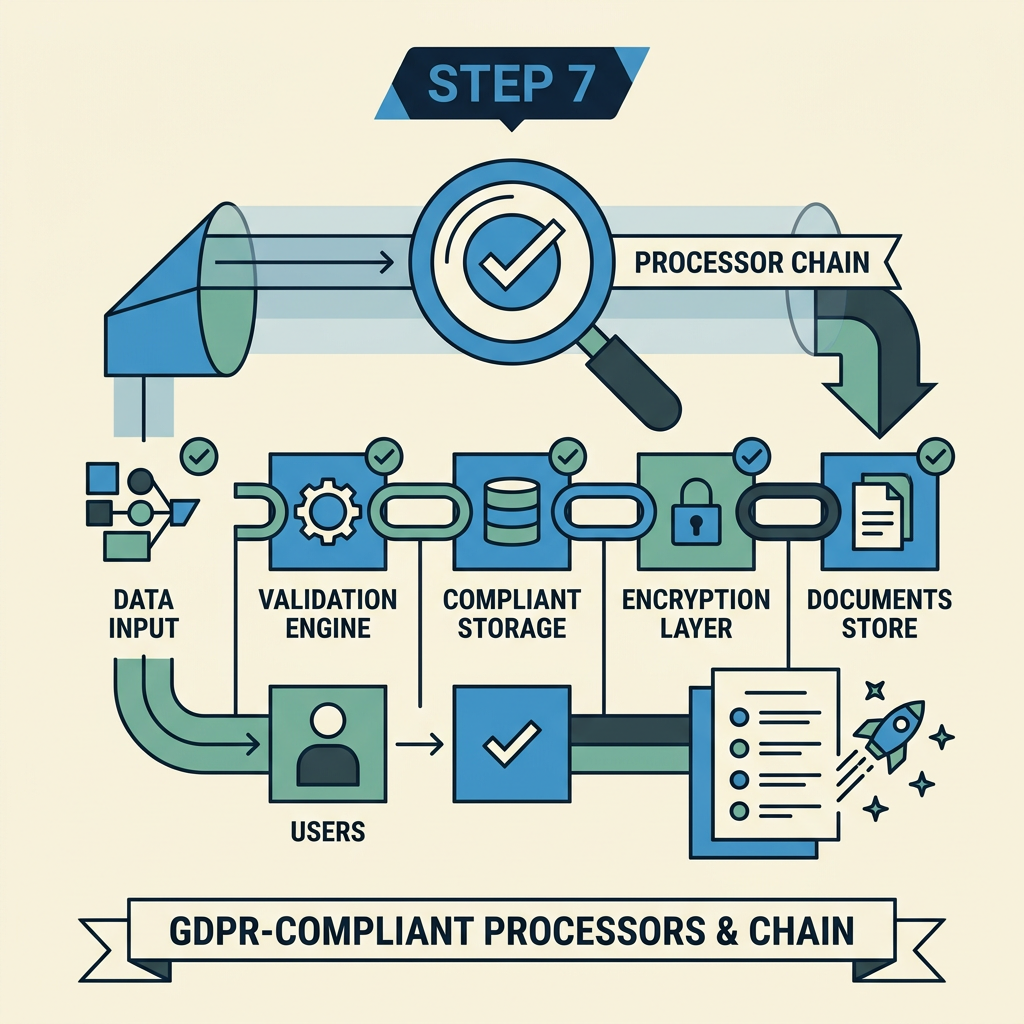
Many indie developers assume their form provider handles compliance. Most do not. Formspree, Basin, and similar services offer basic GDPR compliance, but none eliminate your responsibility as the data controller.
Evaluating Form Processor Compliance Posture
Before integrating any form service, download or request their DPA, security audit (SOC 2 report), and privacy policy. Look for:
- Data Location: Is data stored in the EU or with Standard Contractual Clauses in place?
- Encryption: Are submissions encrypted at rest and in transit?
- Retention Policy: Does the provider retain your data indefinitely, or can you set deletion schedules?
- Sub-processor Transparency: Are you informed if the processor uses third-party vendors (e.g., AWS for storage)?
- Incident Reporting: Will they notify you within 72 hours of a breach?
FormBeam, purpose-built for indie developers and small teams, offers built-in compliance features: EU-based infrastructure, automatic encryption, timestamped consent logging, and data deletion workflows. Unlike legacy form builders that treat compliance as an afterthought, FormBeam's architecture prioritizes privacy from the start, allowing developers to embed GDPR-compliant forms in one line of code.
Documenting Your Data Processing Chain
If your form routes through multiple vendors (e.g., HTML form → FormBeam → email service → your inbox), document this chain. You are responsible for every step. Your RoP should list: initial form processor, email handler, analytics tags, and any other systems touching the submission.
Ensure a DPA exists for each step, and confirm that sub-processors (vendors your processor uses) are also GDPR-compliant.
Step 8: Prepare for an Audit or Data Subject Request
Regulators or users may eventually request proof of compliance. Have a documented response procedure:
Audit Readiness Checklist
- Records of Processing: A spreadsheet or document listing all datasets, their lawful bases, retention periods, and processors.
- DPA Copies: Signed Data Processing Agreements for every vendor handling form data.
- Consent Logs: Timestamped records of consent for every form submission.
- Privacy Policy and Notices: Copies of form-level disclosures shown to users at time of submission.
- Incident Log: Any breaches or suspicious activity, including notification timelines and remediation steps.
- Script Audit Report: Documentation of third-party tags and consent mechanisms protecting them.
Responding to Data Subject Requests
When a user requests their data or deletion, log the request date and respond within 30 days. Extract their submissions, package them in a readable format (CSV, PDF), and provide a download link. For deletion requests, remove the data from all systems and confirm completion in writing.
Keep a record of the request and your response. This log is your proof of GDPR Article 17 compliance.
Comparison: Form Processing Solutions and GDPR Compliance
| Form Processor | DPA Provided | Data Location | Consent Logging | Best For |
|---|---|---|---|---|
| FormBeam | Yes, included | EU + SCCs | Timestamped, audit-ready | Static sites requiring production-ready compliance |
| Formspree | Yes, upon request | US (SCCs available) | Basic logging | Simple contact forms, budget-conscious teams |
| Basin | Yes, upon request | US (SCCs available) | Basic logging | Lightweight form handling |
| Custom Backend (no service) | Not applicable | Self-managed | Manual implementation required | Teams with engineering resources for infrastructure |
For indie developers and small teams, managed solutions like FormBeam eliminate infrastructure maintenance while providing audit-ready compliance features out of the box. Building your own backend requires engineering effort to implement encryption, consent logging, and processor agreements correctly.
Conclusion
GDPR compliance for static website forms is not optional—it is a legal requirement with potentially severe consequences. The good news: the core principles are repeatable and can be systematized.
By implementing this eight-step checklist, you establish a defensible compliance posture. Authorities now issue 330+ individual fines per year, with average penalties reaching €2.3 million. The cost of compliance infrastructure—whether through a service like FormBeam or manual documentation—is negligible compared to the risk of non-compliance.
Start today: audit your current forms against the lawful basis and consent requirements outlined above. Implement transparent privacy notices. Select a GDPR-compliant form processor with a signed DPA in place. Document your retention and deletion policies. And maintain your records of processing as a living document, updated whenever your form setup changes.
Try FormBeam to embed GDPR-compliant forms in your static site without backend complexity. FormBeam handles submission storage, consent logging, email notifications, and spam filtering—all with built-in GDPR safeguards, so you can focus on your product rather than infrastructure.
FAQs
What is the most common GDPR violation for website forms?
Insufficient technical and organizational security measures represent the most frequent violation, accounting for 29% of all GDPR fines in 2025. This includes unencrypted form submissions, unauthorized third-party scripts collecting data without consent, and failure to maintain consent logs. For static website forms, common failures are missing HTTPS enforcement, lack of signed Data Processing Agreements with form processors, and pre-checked consent boxes that fail to meet the "affirmative opt-in" standard. Avoiding these three issues alone—encryption, processor vetting, and explicit consent—eliminates the majority of enforcement risk.
Do I need a Data Processing Agreement if I use a form service like FormBeam?
Yes, absolutely. A Data Processing Agreement (DPA) is mandatory under GDPR Article 28 whenever a vendor handles personal data on your behalf. The processor (the form service) must agree in writing to process data only on your instruction, maintain security, and assist with data subject requests. If a form processor cannot provide a signed DPA, they are not GDPR-compliant and pose significant legal risk. Most reputable services, including FormBeam, provide DPAs as standard. Before signing up, request the DPA template and confirm the processor meets your security and location requirements. A signed DPA is non-negotiable and is one of your key audit-readiness documents.
How long can I keep form submission data before I must delete it?
There is no universal timeframe under GDPR; retention depends on your documented business purpose. For transactional contact forms, 90 days is a common and defensible retention period—time enough to respond and archive, but not so long that you risk data hoarding. For mailing list signups, retention should match your contract with the user (e.g., "until you unsubscribe"). For support tickets, you might retain data for one year to handle follow-ups and disputes. The key is to define your retention schedule in your privacy policy and records of processing, then automate deletion when the period expires. If a user requests deletion (Article 17), you must comply within 30 days regardless of your standard retention window. Document all deletion requests and completion dates for audit purposes.