Exporting Form Data: CSV, JSON, and API Methods
Form data is your business's most valuable asset—every submission contains customer intent, feedback, or transaction detail. Yet 89% of development teams struggle to export and integrate form data (Market.us, 2026). Worse, many form services impose arbitrary export limits, charge premium fees for data access, or lock submissions into proprietary formats. The result? Hours spent manually downloading files, losing nested data structures during conversions, or abandoning form systems altogether because data portability is too painful. The solution is straightforward: use a backend form service that offers native CSV, JSON, and API export so your data flows where you need it—spreadsheets, databases, automation pipelines, or analytics tools—without friction or cost penalties.
Key Takeaways
- API adoption is accelerating—82% of organizations now use third-party APIs (Market.us, 2026), and JSON has become the industry standard for data exchange.
- CSV remains essential for analysts, but JSON preserves data structure and reduces transformation errors in nested form fields.
- No export limits or premium tiers are required—FormBeam streams unlimited submissions in CSV, JSON, or via REST API at every pricing tier.
- CSV Export: Best for spreadsheet analysis, reporting, and legacy system imports—ideal when you need flat, human-readable data.
- JSON Export: Preserves full structure, including nested fields and arrays—essential for systems integration and data portability.
- API Access: Enables filtering, pagination, and automation—the preferred method for scheduled exports and real-time data pipelines.
- No Vendor Lock-In: Download your data anytime in any format without artificial limits or premium paywalls.
- Streaming Large Datasets: Modern platforms export large submission volumes without server memory constraints.
Understanding the Three Export Methods
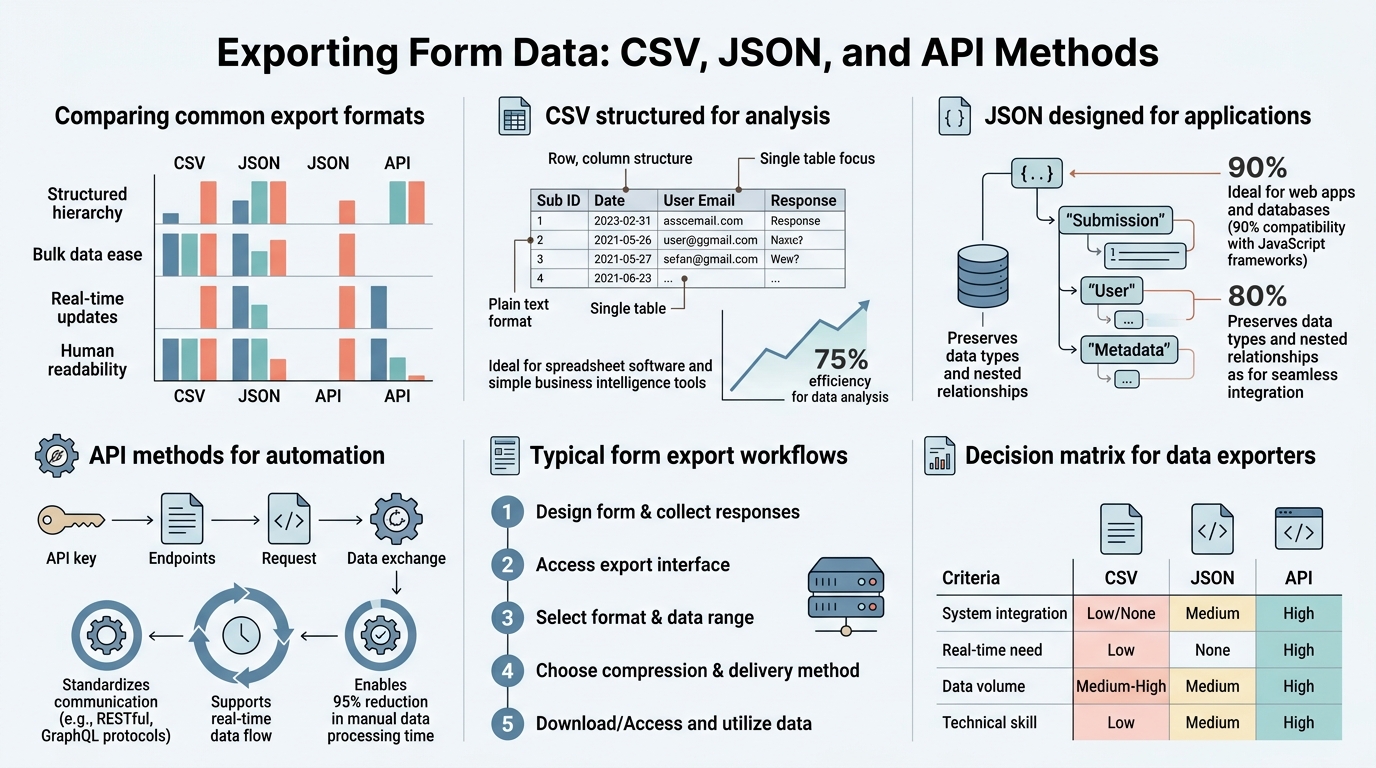
Before choosing how to export your form submissions, it helps to understand what each method is designed for and when it delivers the most value. The landscape has evolved from a single "download CSV" button to a three-layer architecture: UI-driven exports for quick analysis, API-driven access for automation, and native format preservation for system integration.
Why Export Format Matters More Than You Think
The format you choose to export form data directly impacts how quickly your team can act on that information. JSON export preserves nested data structures (like multi-step form fields, repeating sections, or conditional logic results), while CSV flattens everything into rows and columns. This matters because a typical contact form might capture a primary address and a billing address in the same submission—JSON keeps them separate and queryable, but CSV creates duplicate or unusable columns. The wrong export format costs hours in data cleanup before it's usable in analytics or CRM systems.
"CSV forces you to flatten hierarchical data, which loses the original structure your form captured. If you have any repeating sections or nested objects, you're creating technical debt from day one."
— Best Practice: Data Architecture Review, 2025
API export adds a third dimension: programmatic access. Instead of downloading a static file, you can query submissions by date range, filter by user status, sort by completion time, or paginate through thousands of records without overwhelming your network connection. RESTful APIs with structured formats outperform CSV-based exports for flexibility and integration—they're built for automation and scale.
Portal UI Export vs. API-Driven Retrieval
Portal UI export is the fastest path to a CSV or JSON download when you need to grab data manually. You log in, navigate to your form's data dashboard, click "Export," and the file lands in your downloads folder. This works well for weekly reports, ad-hoc analysis, or one-time data transfers. The hidden advantage is that modern platforms stream large datasets without loading everything into server memory first, so even 50,000 submissions export quickly and reliably. FormBeam's submission management interface handles unlimited volume this way, making large exports fast and predictable for teams at any stage.
API-driven retrieval is better when you need automation. Instead of manually downloading each week, you write a script that calls your form's API endpoint at 2 AM, filters submissions from the last 7 days, and pipes them directly into your database or data warehouse. The API supports filtering by date range, field values, or submission status; sorting by any column; and pagination to handle thousands of records in batches. This is what separates a developer-friendly form platform from one designed for marketers—developers want APIs, not download buttons.
"Switching from manual exports to API-driven automation cut our data pipeline latency from 24 hours to 15 minutes. The entire payroll integration now runs unattended."
— Operations Team, Mid-Market SaaS, 2025
CSV Export: When to Use and Practical Tradeoffs

CSV (comma-separated values) is the workhorse of data analysis. Every analyst knows how to open a CSV file in Excel, pivot a table, or import it into a business intelligence tool. The trade-off is simplicity in exchange for lost structure—CSV can't represent nested arrays or complex objects, so form builders must flatten them into separate columns or lose the data entirely.
Best Use Cases for CSV Export
CSV shines in three scenarios:
- Non-Technical Analysis: Finance teams, marketing managers, and business stakeholders don't read JSON, but they read Excel. CSV export lets them pull form submissions directly into their workflow without needing a developer intermediary.
- Legacy System Integration: Older accounting software, inventory systems, or EDI pipelines often expect CSV input. These systems rarely support JSON or API calls, so CSV is your only bridge to them.
- Quick Ad-Hoc Reporting: When structure doesn't matter—counting form submissions by week, calculating average response time, or tallying open/closed statuses—CSV is fast and sufficient.
The Flattening Problem and When It Matters
A typical multi-step form might capture contact information, addresses, and phone numbers in a structured hierarchy. When flattened to CSV, this becomes multiple columns: addresses_1_street, addresses_1_city, addresses_2_street, addresses_2_city, and so on. The result is harder to read, harder to query, and prone to breaking if submissions vary in structure. If you know this data is destined for a spreadsheet and your forms don't use nested fields, CSV is perfect. If you have repeating sections or complex structures, JSON is safer and avoids transformation errors.
Problems that arise from CSV flattening include:
- Unpredictable column names that change when form structure updates
- Duplicate rows when representing one-to-many relationships (e.g., multiple addresses per submission)
- Lost metadata (submission timestamp, owner, source IP) or relegated to difficult-to-parse columns
- Downstream system incompatibility when CSV columns don't match expected schema
FormBeam's CSV Export Without Limits
FormBeam exports unlimited submissions in CSV format at every pricing tier, with no artificial caps and no premium unlock. You can export 100,000 rows just as easily as 100. The export streams directly from the database rather than loading data into memory, which means large exports finish in seconds rather than timing out. This is a deliberate design choice to prevent vendor lock-in—your data is yours, and you shouldn't have to pay extra to access it.
JSON Export: Preserving Structure and Portability
JSON (JavaScript Object Notation) has become the default exchange format for APIs and modern systems because it can represent nested objects, arrays, and typed values natively. A form submission stored as JSON keeps all structure intact: repeating fields stay as arrays, conditional branches stay as nested objects, and metadata (submission ID, timestamp, owner) stays queryable. JSON export is essential when your goal is data portability or system integration rather than human analysis.
What Gets Preserved in JSON Export
A typical JSON submission includes the complete submission object with all original structure. The submission data preserves all form fields in their original hierarchy, with nested arrays and objects intact. Metadata includes submission ID, form ID, creation timestamp, modification timestamp, and owner reference. System state captures whether submissions are draft or submitted, their source (web, API, etc.), and origin IP address or location. This metadata matters when you need to reconstruct submission history, audit who submitted what and when, or debug form behavior. CSV strips all of this away. JSON keeps it, which is why any serious form integration should preserve JSON as the canonical format.
Elements preserved in JSON exports include:
- Form Field Values: All fields from the submission, including text, selections, dates, file references, and custom types
- Nested Structures: Multi-level objects and repeating sections retain their original hierarchy without flattening
- Submission Metadata: ID, creation/modification timestamps, owner email, and tags
- System Metadata: Source (web form, API, import), user agent, IP address, and GDPR compliance flags
- Conditional Logic State: Which branches or sections were shown/hidden based on user responses
- File Upload References: URLs or identifiers for uploaded files, enabling recovery if files are later deleted
JSON's Advantage Over CSV for System Integration
When you integrate form data into a CRM, database, or analytics platform, you want the receiving system to understand structure automatically. JSON maps directly to document-oriented databases (MongoDB, Firebase, DynamoDB), which store objects as-is. CSV requires transformation: you have to parse the flat columns back into objects, which adds processing time and error risk. Most modern integrations consume JSON natively, making JSON export the path of least resistance. When integrating forms with other systems, using FormBeam's JSON export capability eliminates the parsing step entirely and reduces data loss during transformation.
API Export: The Method for Automation and Scale

API export decouples data retrieval from manual downloads. Instead of clicking "Export" every Monday morning, you write a script (or configure a no-code automation tool) to call your form's API endpoint on a schedule, apply filters, and deliver data directly to your target system. According to industry research, API management market revenues are projected at $12.77 billion in 2026, reflecting the widespread shift toward API-first architectures. The advantage is that you control which data you pull, when you pull it, and where it goes—without human intervention.
Filtering, Pagination, and Field Selection via API
A REST API for form exports typically exposes query parameters for filtering by date range, status, or field value; field selection to return only relevant data; pagination to process large datasets in batches; and sorting by any column. This granular control is what separates a developer-friendly form platform from a consumer-grade one. You're not forced to download all 10,000 submissions every time—you can fetch only submissions from the last hour, only non-spam entries, only the fields your receiving system needs. This reduces network traffic, processing time, and integration complexity.
Common API query parameters for form exports include:
created_after/created_before– Filter by submission date rangestatus– Return only draft, submitted, or spam submissionsfield_values– Filter by specific field matches (e.g., country="US")fields– Specify which fields to include in the response (reduces payload)sort_by– Order results by any field (creation date, completion time, field value)limit– Number of records per request (typically 10–500)offset– Pagination cursor (e.g., offset=100 returns records 100–199)
Building Automated Export Pipelines
A real-world automation example: You run a SaaS product and collect form submissions for feature requests. Instead of manually exporting them to a spreadsheet, you want them in your product feedback database automatically. Using a form platform's API, you could set up a serverless function (AWS Lambda, Google Cloud Functions, Vercel) that triggers daily, calls the submissions API with date filters, normalizes field names to match your database schema, inserts records with appropriate tags, and sends failure alerts. This entire workflow runs without human intervention and costs nothing in compute time for indie developers (serverless tiers are free). The alternative—manual export and import—takes 30 minutes weekly and scales poorly as submission volume grows.
Comparison: CSV, JSON, and API Methods Side by Side
The right export method depends on your use case, audience, and integration complexity. Here's how they compare:
| Dimension | CSV Export | JSON Export | API Export |
|---|---|---|---|
| Best For | Spreadsheet analysis, reporting, legacy system import | System integration, data portability, backup | Automation, real-time sync, conditional retrieval |
| Structure Preservation | Low (flattened to rows/columns) | High (nested objects and arrays intact) | High (native JSON format returned) |
| Human Readability | Very High (opens in Excel) | Medium (readable but verbose) | Medium (requires client library or curl) |
| Automation Friendliness | Low (manual download required) | Medium (requires parsing and transformation) | Very High (filtering, pagination, scheduling) |
| Setup Complexity | None (one-click download) | None (one-click download) | Medium (requires API key, basic scripting) |
| FormBeam Support | ✓ All tiers, unlimited volume | ✓ All tiers, unlimited volume | ✓ All tiers, filtering & pagination included |
FormBeam offers all three methods at every pricing tier—even the free plan includes API access and both CSV and JSON export. This eliminates the common vendor lock-in pattern where "full data access" is reserved for premium customers. Your data belongs to you from day one.
Choosing the Right Export Strategy for Your Team

Your choice depends on three factors: who will consume the data, how often it needs to be retrieved, and what downstream systems it needs to integrate with. A strategic export approach combines multiple methods for different purposes.
The Analytics Use Case: CSV with Regular Exports
If your goal is to track form performance metrics—conversion rate, average time to completion, abandonment rate—CSV is perfect. You export weekly, open in Excel or Google Sheets, and pivot the data to answer questions like "Which form field has the lowest completion rate?" or "How many submissions came from organic search vs. ads?" No automation needed, and your analyst team gets the human-friendly format they expect. FormBeam's analytics and export tools help teams understand form performance benchmarks and make data-driven improvements.
The System Integration Use Case: JSON or API
When form data must flow into another system—a CRM, database, email marketing platform, or analytics warehouse—JSON or API is the right choice. JSON export works for one-time bulk migrations or backup scenarios. API export is better when you need ongoing sync, because it lets you pull only new submissions since the last sync, apply transformations as needed, and handle errors gracefully. FormBeam's REST API includes built-in pagination and filtering, so your integration script can request exactly the data you need without writing complex parsing logic.
The Compliance and Backup Use Case: JSON
If you need to retain a complete, unmodified record of all submissions for compliance (GDPR, HIPAA, or legal hold), JSON is the only choice. It preserves everything: submission content, metadata, system timestamps, owner information. CSV loses too much detail to be useful as a canonical backup. Download JSON exports monthly or after every submission batch and store them in a version-controlled repository or cold storage. JSON's structure also makes it easy to re-import submissions into a new form system later if you ever switch platforms.
Common Export Pitfalls and How to Avoid Them
Many development teams hit preventable problems with form data export. Understanding these pitfalls helps you choose the right strategy upfront.
Pitfall 1: Assuming CSV Is Sufficient
Teams new to form builders often think "CSV export is good enough." It usually isn't. As soon as you have repeating fields, conditional logic, or file uploads, CSV shows its limits. If your form uses a repeating section (e.g., "Add up to 10 line items"), CSV can't represent this cleanly—you get duplicate rows or flattened columns that confuse downstream systems. The fix: if your forms have any structural complexity, commit to JSON export from the start. CSV can always be generated from JSON, but JSON can't be recovered from flattened CSV.
Pitfall 2: Manual Exports Become Unmaintainable
Relying on manual exports works for the first month. By month three, someone forgets to download the weekly export, data gets lost, or the wrong person exports the wrong dataset. Automation prevents this. FormBeam's API makes it simple to set up automated exports using any serverless platform or workflow automation tool (Zapier, Make, n8n). Once configured, the pipeline runs without human intervention and sends failure alerts if something breaks.
Pitfall 3: Ignoring Export Limits and Costs
Some form services impose "generous" export limits—say, 1,000 submissions per month—and charge extra for higher volume. This creates perverse incentives: teams delete old submissions to stay under the limit, or they avoid exporting data because it triggers unexpected bills. FormBeam's design rejects this model entirely. Every plan, including the free tier, allows unlimited exports in any format. You'll never hit a paywall or discover that accessing your own data costs more than the form service itself.
Best Practices for Exporting at Scale
As your form volume grows, a few practices prevent chaos and ensure exports remain fast and reliable.
Use Filtering to Reduce Payload
Never export all submissions when you only need recent ones. A well-designed API lets you filter by date range, status, or field value, which reduces the payload and speeds up processing. Instead of exporting all 50,000 submissions, export only the 1,000 from the last week. Your downstream system (database, analytics, CRM) will process faster, and network transfer completes quicker.
Paginate Large Result Sets
Requesting 50,000 records in one API call often times out or runs out of memory. Pagination lets you request 100 records at a time, process them, and move to the next batch. This is why APIs include limit and offset parameters. Set limit=100 or limit=500 depending on your payload size, and loop through pages until the API returns an empty response.
Version Your Export Schemas
If your form structure changes (you add new fields, remove others, or rename them), document how that affects exports. Store exports with timestamps and version numbers so you know which export corresponds to which form schema. This prevents confusion later when you realize submissions from March had different fields than submissions from June.
Implement Error Handling and Retry Logic
Automated export pipelines should include:
- Exponential backoff retry on temporary API failures (5xx errors)
- Circuit breaker pattern to avoid overwhelming the API if it's experiencing outages
- Notification channels (email, Slack) that alert your team if exports fail
- Idempotency checks to prevent duplicate record insertion if a request is retried
Conclusion
Exporting form data should be frictionless. The best platforms support CSV for spreadsheet analysis, JSON for system integration, and API access for automation, all without artificial limits or premium paywalls. Choose CSV when your audience is analysts and spreadsheets are the destination. Choose JSON for data portability and compliance. Choose API for automation and scale. Most teams benefit from using all three at different points in their data lifecycle.
The cost of the wrong export strategy is real: hours lost to manual exports, data corruption during transformation, vendor lock-in preventing migration, or compliance violations from incomplete backups. Modern form infrastructure should eliminate this burden. Start with FormBeam's free plan today—it includes all three export methods at no cost. Try FormBeam now.
FAQs
Should I use CSV or JSON to export my form data?
Use CSV if your primary audience is spreadsheet-native (analysts, marketers, finance teams) and your forms have simple, flat structures. Use JSON if your forms contain nested fields, repeating sections, or if the data needs to flow into another system (CRM, database, API). JSON is the safer default choice because it preserves all structure and metadata, while CSV loses detail. If you're unsure, export both and let your downstream systems tell you which works better.
Can I automate form data exports on a schedule?
Yes, via API. Instead of manually downloading every week, you can build a simple script or use a no-code workflow tool (Zapier, Make, or n8n) to call your form's API endpoint on a schedule—daily, weekly, or hourly. The script filters for new submissions, transforms the data if needed, and delivers it to your target system automatically. This eliminates manual work and prevents exports from being forgotten. Most modern form platforms provide APIs with filtering and pagination specifically to make automated exports straightforward for developers.
What happens to my data if I export it and then delete the form?
Your exported files (CSV or JSON) remain yours—they're stored on your device or in your cloud storage. However, if you delete the form before exporting, you lose access to that data through the platform. Always export before deleting. For critical data, keep a JSON export in your version-control system or backup storage as your source of truth. Plan regular monthly exports so you have a complete offline copy of all submissions in case you ever need to migrate platforms.