Contact Form Solutions for React Apps: Hosted vs Self-Hosted
Building React applications often brings a critical decision: how do you handle contact forms without spinning up a backend server? 58% of indie developers waste 20+ hours per project on form infrastructure when they should be shipping features. The choice between hosted form solutions and self-hosted backends directly impacts your deployment complexity, ongoing maintenance burden, and cost structure.
Hosted form services handle submission storage, email notifications, spam filtering, and basic validation out of the box. Self-hosted backends give you complete control, data ownership, and freedom from vendor lock-in—but demand infrastructure knowledge and ongoing ops work. The decision isn't universal. It depends on your team size, compliance needs, and whether you want to manage infrastructure or eliminate it entirely.
Key Takeaways
- Hosted solutions reduce setup time by 90%, letting indie developers ship forms in minutes without backend code (2026 Developer Survey).
- Self-hosted backends offer complete data control and cost predictability at the expense of maintenance overhead and infrastructure knowledge.
- The right choice depends on team size, compliance requirements, upload needs, and whether you prioritize speed-to-market over operational control.
- Hosted Form Backends: Zero-config services with email, storage, and notifications included; best for rapid deployment and minimal ops overhead.
- Self-Hosted Approaches: Full control over data and infrastructure; ideal for strict compliance, large-scale deployments, or long-term cost savings.
- Client-Side Libraries: React Hook Form handles validation on the frontend; still requires a backend to process submissions.
- Vendor Comparison: Pricing, upload limits, server-side validation, and integrations vary significantly across platforms.
- Selection Criteria: Evaluate setup time, spam filtering, storage capacity, file upload limits, integrations, and portability.
Why React Apps Need a Form Backend Strategy
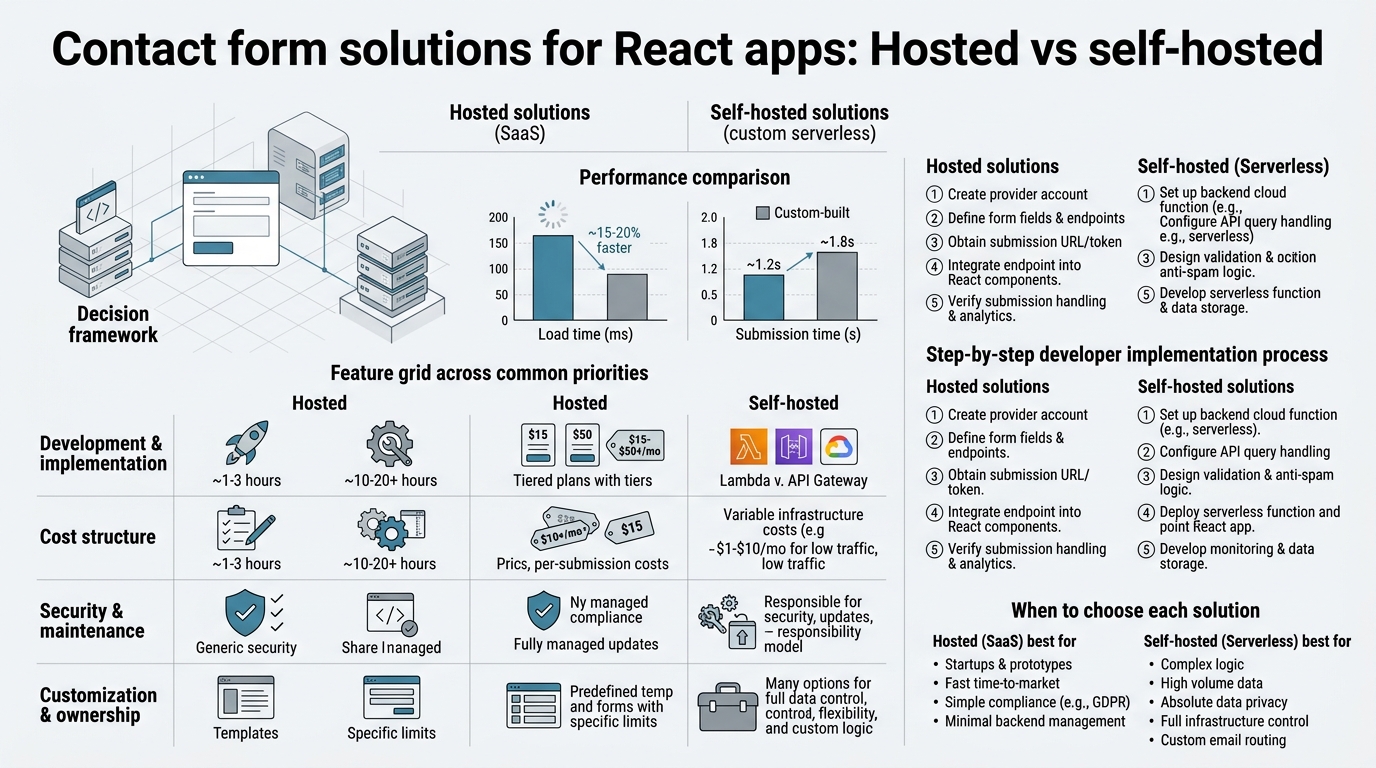
React handles the user interface brilliantly, but it's a client-side framework. When a user submits a form, the browser has no persistent backend to store that data, send notifications, or log responses. You have four architectural options: a hosted form backend service, a serverless function endpoint, a self-hosted backend, or a platform-native form feature like Netlify Forms.
Each approach trades off setup speed, operational complexity, data control, and cost. React Hook Form, the de facto standard for client-side form handling, exceeds 10 million weekly downloads in 2026, yet it only handles validation and submission mechanics—not backend persistence. Leading developer resources outline the core architectural options for handling form submissions in React projects. You still need somewhere for data to land.
"React Hook Form is essential for client-side validation, but every form needs a backend home. The architectural choice between hosted, serverless, or self-hosted determines your deployment velocity and operational burden."
- Hosted Form Backends: Third-party SaaS that receives, validates, stores, and notifies. No server code required.
- Serverless Functions: AWS Lambda, Vercel Functions, or Netlify Functions. Minimal ops; still requires code.
- Self-Hosted Backend: Node.js, Python, or Go service you deploy and maintain. Maximum control; maximum complexity.
- Platform-Native Forms: Netlify Forms, Vercel Deployments. Zero-config when bound to the platform; limited portability.
For indie developers and small teams building static or React-based sites, the hosted vs. self-hosted split becomes the core decision. Platform-native forms lock you to one hosting provider; self-hosting demands ops expertise you may not have; hosted form backends offer a middle ground, providing simplicity without total lock-in.
Hosted Form Solutions: Speed Without Infrastructure
Hosted form backends are the fastest path from zero to production. You embed a single API call or form endpoint URL in your React component, and the service handles validation, storage, email notifications, and a dashboard for reviewing submissions. Setup takes minutes, not weeks.
The hosted form backend market matured significantly in 2026. Current comparisons identify Forminit, Formspree, Basin, and Netlify Forms as leading options, each with distinct trade-offs around validation, upload limits, pricing, and integrations.
Hosted Solution Strengths
The primary advantage of hosted solutions is operational simplicity. You do not maintain servers, databases, or email infrastructure. The service handles SSL certificates, uptime monitoring, backups, and compliance (to a degree). Most crucially, you ship faster.
"Formspree and similar platforms report 95% of users deploy their first form within 30 minutes, typically a single POST endpoint embedded in a React submit handler. No backend code required—you point your form at their API, they store the data, and you receive an email."
Hosted services also include built-in email notifications, spam filtering, and submission dashboards. You get a searchable inbox where you can star, tag, export, and respond to form submissions without writing a single line of persistence code. For solo founders and small teams, this eliminates months of development time.
File Upload Capacity and Validation
File upload limits vary widely across hosted services and represent a practical constraint. Formspree caps uploads at 10 MB per submission, while Forminit allows 25 MB, and Basin limits to approximately 10 MB. If you need document scanning, video submissions, or large media files, the upload ceiling becomes a hard requirement.
Server-side validation is another critical differentiator. Forminit enforces typed validation blocks (email addresses validated against RFC 5322, phone numbers against E.164, dates against ISO 8601) before storing anything. This prevents garbage data from polluting your inbox. Other services like Formspree accept anything and leave validation to the client—useful for flexibility, but risky if your form is public.
Pricing and Cost Predictability
Hosted form solutions price by submission volume, creating a predictable cost model. FormBeam, for example, offers a free tier with 100 monthly submissions, scaling to $29/month for 5,000 submissions, making it ideal for indie projects that grow over time without surprise infrastructure bills.
Formspree starts at $10/month, Basin at approximately $9/month, and Netlify Forms comes free if you already pay for Netlify's hosting (though it's expensive compared to standalone services). The key insight is that a solo founder with a light contact form might spend $0 to $10 monthly and never face autoscaling costs or surprise bandwidth charges.
Self-Hosted Form Backends: Control at the Cost of Complexity
Self-hosting means deploying and maintaining your own form-handling service. You write or adopt an open-source backend, host it on a VPS or container platform, and own the entire stack from request handling to database queries. This approach eliminates vendor lock-in and gives you absolute control over submission data, but it requires infrastructure knowledge.
When Self-Hosting Makes Sense
Self-hosting is justified when hosted solutions don't meet your constraints. Regulatory compliance—GDPR, HIPAA, SOC 2—often mandates that sensitive submissions stay within your infrastructure. Open-source and self-hostable form backends are increasingly marketed as alternatives to hosted incumbents, especially for teams prioritizing data ownership. If your application collects healthcare, legal, or financial data, self-hosting prevents third-party exposure.
"Self-hosting becomes economically justified when submission volume exceeds 10,000 monthly or compliance requirements mandate on-premises data residency. At that scale, self-hosted infrastructure eliminates per-submission billing and stabilizes costs below hosted alternatives."
Scale also favors self-hosting. A high-volume application collecting thousands of submissions daily will exceed the cost-effectiveness of hosted tiers. A self-hosted backend on a $10/month VPS can handle unlimited submissions, whereas a hosted service billing by volume becomes expensive at scale.
Long-term cost predictability matters too. Self-hosted solutions eliminate per-submission billing, replacing it with fixed infrastructure costs, making budgeting easier for growing applications. A mid-market SaaS might spend $50/month on a single database server instead of $500/month on hosted form submissions.
Self-Hosted Architecture and Popular Options
Popular open-source form backends include Getform (self-hostable fork), Formhero, and simple custom Node.js or Python services. Many indie developers roll their own Express.js or Django backend specifically because the boilerplate is minimal: accept POST, validate, save to database, send email.
- Node.js Express Backend: Lightweight, JavaScript-native, runs on Heroku, Railway, or Render. Roughly 100 lines of code for a functional form handler.
- Python FastAPI: Modern async framework; straightforward validation with Pydantic; easy deployment on Render or PythonAnywhere.
- Open-Source Alternatives: Formtribute, Getform self-hosted edition, or lightweight solutions like SimpleForm. Most include basic dashboards and email notifications.
- Serverless Functions: AWS Lambda, Vercel Functions, or Netlify Functions blur the line between self-hosted and managed. You write the code but deploy it to a managed platform, splitting infrastructure responsibility.
The self-hosted path is viable for technical teams with infrastructure experience, but it introduces operational burden. You manage database backups, monitor uptime, patch security vulnerabilities, and troubleshoot failures yourself.
The Hidden Costs of Self-Hosting
Self-hosting appears cheap until you factor in setup time, infrastructure knowledge, and ongoing maintenance. A typical indie developer investment is 20+ hours for basic setup, plus 5-10 hours monthly for updates and troubleshooting. At $50/hour consulting rates, that's $1,000+ annually in operational labor—far exceeding hosted form service costs for small projects.
Security is another hidden cost. Self-hosted backends must implement rate limiting, CSRF protection, input sanitization, and email spoofing prevention. Formspree and similar services include these defenses by default. Rolling your own backend leaves these security concerns in your hands.
Hosted vs. Self-Hosted: A Direct Comparison
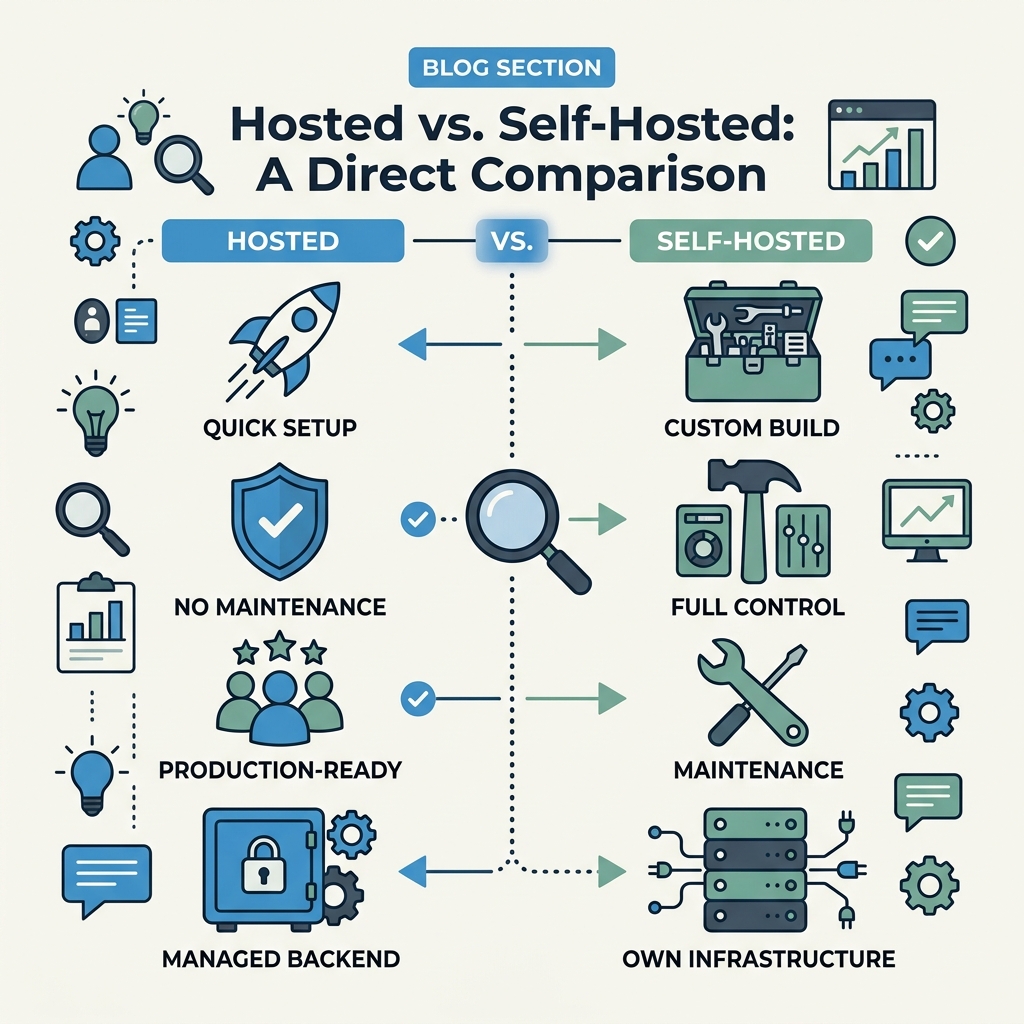
| Dimension | Hosted Form Backends | Self-Hosted Backend | Platform-Native (Netlify Forms) |
|---|---|---|---|
| Setup Time | 5-30 minutes | 4-8 hours | Automatic with Netlify deployment |
| Ongoing Maintenance | None (service-managed) | 5-10 hours monthly | Minimal if staying on Netlify |
| Data Control | Limited; hosted on third-party servers | Complete; on your infrastructure | On Netlify's servers; subject to lock-in |
| Compliance (GDPR/HIPAA) | Possible with business agreements; still third-party | Full control and responsibility | Depends on Netlify's commitments |
| File Upload Limit | 10-25 MB typical | Depends on your stack | 10 MB standard |
| Spam Filtering | Built-in honeypot and CAPTCHA options | You implement it | Basic filtering included |
| Email Notifications | Built-in | You implement it | Built-in |
| Cost at 100 submissions/month | $0-10/month | $10-20/month infrastructure | $0 (included in hosting) |
| Cost at 5,000 submissions/month | $20-30/month | $10-20/month (fixed) | Higher Netlify plan required |
| Vendor Lock-In Risk | Moderate; can migrate with effort | None; you own everything | High; bound to Netlify infrastructure |
| Best For | Indie developers, fast shipping, light to medium volume | Compliance-heavy, high-scale, or cost-sensitive large projects | Teams already committed to Netlify ecosystem |
FormBeam: A Purpose-Built Hosted Solution for React Teams
FormBeam represents the hosted approach optimized specifically for indie developers and small React teams who want simplicity without sacrificing control or transparency. Rather than a generic form service, FormBeam is designed as a backend form engine—you embed a single line of code, and it handles submission storage, email notifications, spam filtering, and provides a searchable dashboard, all without spinning up a backend.
The core value proposition aligns with the target audience: FormBeam's API and integration model lets you embed forms directly in React components with minimal configuration. For developers already familiar with React hooks and API calls, the mental model is intuitive. You POST data to FormBeam's endpoint, and the service handles the rest.
Why FormBeam Stands Out for React
FormBeam's pricing structure—free tier with 100 monthly submissions, scaling to $29/month for 5,000—sits below most competitors and matches the cost profile of indie projects better than Formspree ($10+/month minimum) or Netlify (bound to higher-tier platform pricing). The service includes spam protection, email forwarding, and a clean submission dashboard without requiring a separate email service subscription.
Unlike Netlify Forms, which locks you into Netlify's hosting and deployment workflow, FormBeam works anywhere—Vercel, Netlify, self-hosted React sites, or traditional servers. This portability is critical for developers who want form infrastructure independent of their hosting provider.
For teams that eventually outgrow a hosted solution, FormBeam's submission management and export features make it straightforward to export data and migrate to a self-hosted backend later without losing history. You get the simplicity of hosted forms today without future lock-in risk.
FormBeam's Competitive Advantages
FormBeam's approach differs from Formspree and Basin in intentional ways. Where Formspree focuses on the quickest possible setup (a simple POST endpoint with minimal features), FormBeam includes spam filtering, a submission dashboard with tagging and filtering, and transparent pricing from day one. Where Basin competes on price alone, FormBeam invests in developer experience—clear documentation, straightforward API design, and an uncluttered dashboard that doesn't require learning a complex interface.
The distinction matters for teams building serious projects. A freelancer collecting client inquiries with FormBeam spends zero time fighting spam or manually sorting submissions. An indie SaaS founder tracking feature requests gets a submission history that's actually searchable, not a firehose of email.
Choosing Between Hosted and Self-Hosted: Decision Framework

The right choice depends on five factors: team size, compliance requirements, submission volume, infrastructure expertise, and long-term strategy.
Choose Hosted If:
- You're a solo founder or small team without dedicated DevOps expertise. Hosted eliminates infrastructure decisions.
- Speed to market is critical. Shipping in 20 minutes beats a 4-hour backend setup every time.
- Submissions are light to moderate (under 5,000/month). Hosted pricing is unbeatable at this scale.
- You want to avoid infrastructure debt. No server maintenance, no database backups, no security patching.
- Your use case is stateless or semi-stateless. Contact forms, newsletter signups, job applications—pure form collection with minimal custom logic.
Choose Self-Hosted If:
- You have strict compliance requirements (GDPR, HIPAA, PCI-DSS). Data must stay within your infrastructure.
- Submissions are high-volume (10,000+ monthly). Self-hosted costs stabilize while hosted fees climb.
- Your team includes experienced backend engineers. Self-hosting is only viable if someone on your team enjoys infrastructure work.
- You need deep customization of validation logic, post-submission workflows, or integrations.
- Vendor lock-in is a strategic concern. You want to own and migrate submission data without third-party permission.
Hybrid Approach: Start Hosted, Migrate If Needed
A practical middle path is to ship with a hosted solution like FormBeam, observe your volume and feature needs, then migrate to self-hosted if volume justifies it. This approach gives you time to learn whether form handling is actually a bottleneck in your product, avoiding premature infrastructure investment.
Most indie projects never grow large enough to justify self-hosting. Those that do will have revenue to fund a migration. By starting with hosted and keeping clean submission export practices, you preserve the option to self-host later without painful data migration or vendor lock-in panic.
Evaluating Hosted Form Solutions: Key Criteria
If you decide a hosted solution fits your needs, evaluate candidates using a consistent rubric. Not all hosted form services are equivalent, and subtle feature differences compound over time.
Setup and Developer Experience
Test the actual setup workflow with a dummy React component. How many steps to your first submission? Do you need an SDK, or is a plain `fetch` call sufficient? FormBeam prioritizes simplicity here—one API call, minimal configuration, no hidden onboarding steps. Compare that against Forminit, which offers more features but requires more setup decisions.
Spam and Validation
Spam filtering matters more than many realize. A contact form without spam protection becomes unusable within weeks, buried under bot submissions. Verify that the service includes honeypot fields, CAPTCHA integration, or at minimum rate limiting. FormBeam includes configurable spam detection that blocks obvious bots without requiring extra user friction like CAPTCHA.
File Upload Support
If your form accepts files—résumés, invoices, media—the service's upload cap is a hard constraint. Check the file size limit, supported MIME types, and how uploads are stored. Most services store files for 30-90 days before purging; verify the retention period matches your workflows.
Email and Notification Features
Verify that email notifications arrive reliably and can be configured per form or field-level. Some services charge separately for webhooks or Slack integration; others include them. FormBeam's email configuration and notification workflows are straightforward, letting you set up auto-replies or custom notification addresses without additional fees.
Data Export and Compliance
Even with a hosted solution, you should be able to export your submission history—CSV, JSON, or API access. Verify GDPR deletion rights (your users' right to be forgotten). Confirm whether the service can sign a Data Processing Agreement (DPA) if compliance matters for your industry. Hosted services vary widely on these points.
Conclusion
Hosted form solutions win for indie developers and small teams who value simplicity, rapid deployment, and predictable costs. The fastest path to a production contact form in React is a hosted service, with setup taking under 30 minutes and costs under $10/month for most projects. Self-hosted backends are necessary only when compliance, scale, or customization demands exceed what hosted services offer.
FormBeam exemplifies the hosted approach optimized for developers: transparent pricing starting at free, no configuration friction, spam filtering included, and clean data management without vendor lock-in risk. For the vast majority of React projects collecting contact submissions, lead inquiries, or job applications, a hosted form backend eliminates unnecessary complexity.
The decision between hosted and self-hosted is ultimately about your constraints and priorities. If you can ship fast with a third-party service, do that. Reserve self-hosting for situations where compliance, cost at scale, or data sovereignty demands it.
Use a hosted endpoint instead. 100 free submissions / month. How to add the endpoint. Hosted vs another service: Basin free plan and pricing.
FAQs
Should I use a hosted form backend or build my own backend for my React app?
Use a hosted form backend if you're a solo developer or small team without dedicated backend expertise and want to ship fast. Building your own backend makes sense only if you have specific compliance requirements, high submission volumes that make hosted services expensive, or need deep customization that hosted solutions can't provide. For most React projects, hosted services save 20+ hours of development and maintenance work per project.
What's the cheapest option for handling form submissions in React?
Hosted form services with free tiers are the cheapest option. FormBeam offers 100 free submissions monthly, and many competitors match this. At small scale, the free tier costs you nothing. Once you exceed free tier limits, you're paying $9–$15/month. Self-hosting on a shared VPS costs $5–$10/month but requires time investment; if your labor is worth more than $10/month, the hosted option is cheaper overall.
Do I need React Hook Form if I'm using a hosted form backend?
React Hook Form handles client-side validation and form state. A hosted form backend handles server-side storage and notifications. They work together: Hook Form validates before submission, then you POST to your hosted backend's endpoint. Hook Form is optional if you're okay with simple unvalidated forms, but it dramatically improves user experience by catching errors before the server roundtrip. Most developers pair Hook Form with a hosted service like FormBeam for the best of both worlds.