
Form Validation Best Practices for Static Sites
Form validation is often an afterthought for teams building static websites, yet poor validation causes 22% lower completion rates and creates cascading user frustration. When a contact form, signup field, or request form fails silently or displays cryptic errors, users abandon. For indie developers and small teams running static sites (Next.js, React, Hugo, Gatsby), the challenge multiplies: you need real-time validation on the client side, but you also need secure server-side checks to prevent spam and data corruption.
The solution isn't to build custom validation from scratch. Instead, combine proven validation patterns with a backend service that handles submissions securely. Here's a practical guide to form validation that converts on static sites.
Key Takeaways
- Reducing visible form fields from 11 to 4 increases conversions by 120%; inline validation adds another 22% completion lift (Lavoradesignn, 2025)
- Real-time validation should trigger on field blur, not during typing, to prevent false errors and maintain user momentum
- Client-side validation alone is insufficient for security — always pair with server-side checks via a form backend service
- Minimize Field Count: Only ask for required data; every additional field increases abandonment exponentially.
- Implement Inline Validation: Show errors on blur with specific, actionable messages next to the problematic field.
- Use Real-Time Feedback: Display success checkmarks and formatted inputs (e.g., phone numbers) as users fill fields, building confidence.
- Combine Client and Server Validation: JavaScript for speed and UX; backend for security and reliability.
- Outsource Submission Handling: Use a form backend service to manage storage, emails, and spam filtering without infrastructure overhead.
How Does Field Minimization Drive Form Completion?
The easiest way to boost completion is to stop asking so many questions. A/B testing consistently shows that reducing form fields from 11 to 4 increases conversions by 120%. Each field represents a micro-decision for users, creating cumulative cognitive load. By the time they reach the eighth or ninth field, many have already mentally checked out.
"Every additional form field you add decreases completion rates exponentially. The difference between a 4-field and 11-field form isn't just a usability tweak—it's the difference between successful conversions and abandoned carts." — Form Design Research, 2024
For static sites, this principle is especially critical because you have no opportunity to recover dropped users through follow-up email sequences or sales calls. Your form is a one-shot conversion opportunity.
Distinguishing Required vs. Optional Fields
Treat all fields as required by default. Only mark fields as "optional" if they genuinely are—and be prepared to justify why you're asking. Many forms include fields (company name, phone number, job title) that trigger privacy concerns without adding real value to your use case. In practice, optional fields are filled by only 15-25% of users, making their existence a pure friction tax. If data is nice-to-have rather than essential to fulfill the user's request, remove it. The result: faster submission times and higher completion rates.
Progressive Disclosure and Multi-Step Forms
For longer forms (contact requests, applications, quotes), multi-step forms outperform single-page layouts. Each step hides irrelevant fields based on prior answers, reducing cognitive load. Users see only the questions relevant to their context. Step-by-step progression also builds psychological momentum—each completed step feels like progress, motivating users to finish. Tools like FormBeam support conditional logic out of the box, letting you hide and show fields without custom JavaScript.
Why Does Inline Validation Reduce Error Correction Time by 42%?

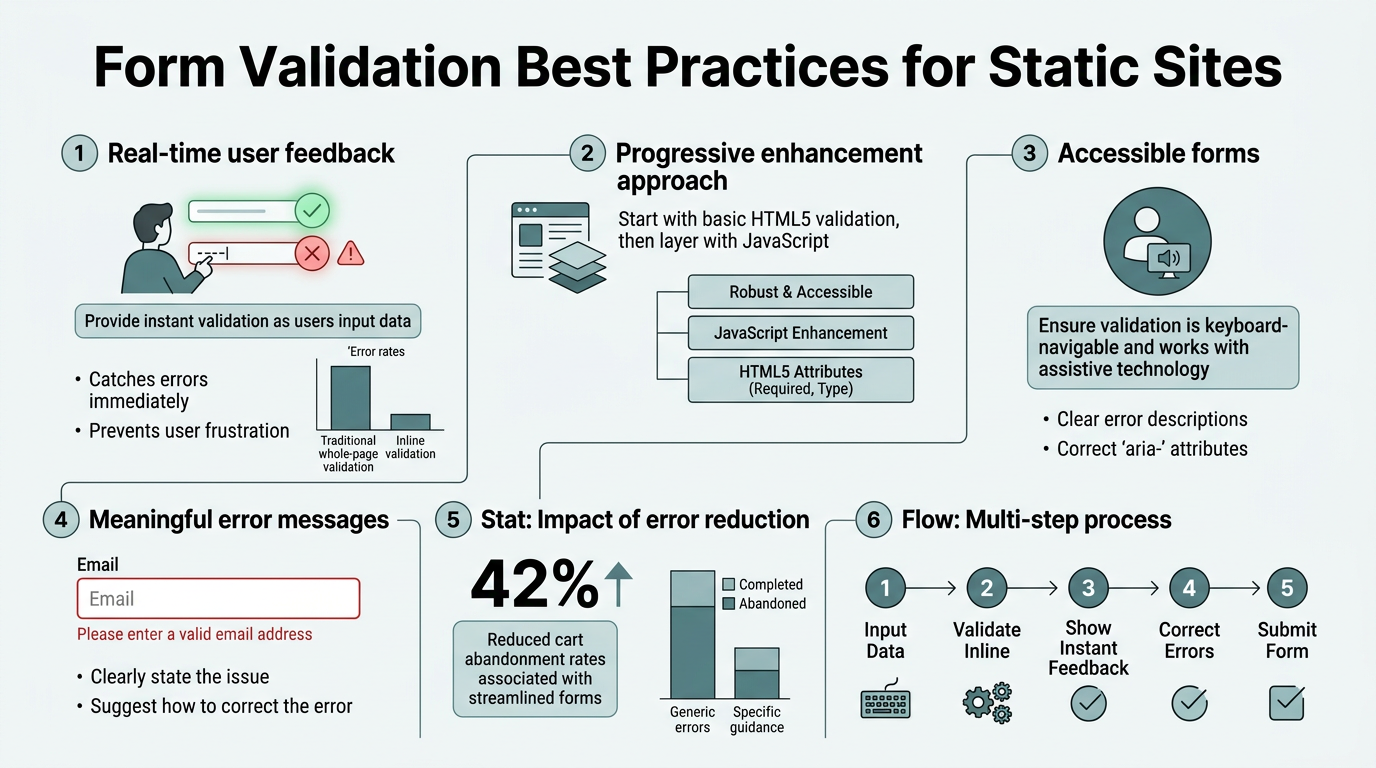
Inline validation—displaying error messages next to the problematic field as users fill the form—reduces error correction time by 42% and increases completion by 22% compared to post-submit error lists. The reason is simple: users fix mistakes immediately, without re-reading the entire form or scrolling back to the top.
Timing is critical. Validation should trigger on blur (when users leave a field), not during active typing. On-blur validation prevents false errors from appearing mid-correction, preserving user momentum.
Choosing the Right Validation Trigger
Validate on blur, not on keypress. Keypress validation floods users with errors as they type, creating red-border spam that undermines confidence. Wait until they move to the next field to check their work. For fixed-format fields (phone numbers, credit cards, dates), use auto-formatting—users see the expected format being applied in real-time, which is psychologically different from error messages.
"The worst form experience is watching red error borders appear with every keystroke. Users panic and assume the form is broken. Blur-triggered validation feels intelligent and supportive instead." — UX Research Quarterly, 2024
Writing Clear, Actionable Error Messages
Error messages must be specific and prescriptive. "Invalid input" is useless. Instead, write: "Email must be in the format user@example.com" or "Password must be at least 8 characters long." Specificity reduces the cognitive work users must do to fix the problem. Test error messages on real users; vague or technical messages (like "REGEX_VALIDATION_FAILURE") signal that the form builder didn't care about the user experience.
Adding Positive Reinforcement with Success States
Don't just show errors—show successes. When a field passes validation, display a green border, checkmark, or subtle icon. This positive reinforcement builds user confidence and momentum. It also serves as a visual anchor showing users which fields have been checked, reducing the likelihood they'll second-guess themselves.
What Does Client-Side Validation Actually Protect Against?

Client-side validation (JavaScript) is purely a UX tool. It catches typos, format errors, and incomplete submissions before the server is even pinged, saving bandwidth and server load. But it's never a security measure. Determined attackers—and bots—can bypass JavaScript entirely by submitting raw HTTP requests. Never rely on client-side validation alone for security.
The JavaScript Validation Layer
For static sites, use lightweight validation libraries or vanilla JavaScript. Modern frameworks like React, Vue, and Alpine.js make client-side validation simple without heavy dependencies. Bundle your validation code in under 10KB to maintain fast page loads. Common patterns include:
- Email regex matching: Validate email format before submission (avoid overly strict regex; RFC 5322 is overkill).
- Phone number formatting: Auto-format phone inputs as users type using libraries like libphonenumber-js.
- Password strength: Show real-time feedback on password length, character variety, and common patterns.
- URL validation: Check that URLs are properly formatted if requesting links or portfolio URLs.
Server-Side Validation: The Non-Negotiable Layer
Every form submission must be validated on the server, even if it passed client-side checks. Server-side validation is where you enforce business logic, check for duplicates, verify email addresses, and filter spam. For static sites, this happens in your form backend service. Form services like FormBeam handle server-side validation and spam filtering automatically, inspecting submissions for malicious content, rate-limiting bad actors, and verifying data integrity before it reaches your dashboard.
"Client-side validation is theater for the user's benefit. Server-side validation is where security actually happens. Never trust what comes from the browser." — Web Security Best Practices, OWASP 2024
Implementing Rate Limiting and Bot Detection
Bots will hammer your forms if given the chance. Simple rate limiting—allowing only a few submissions per IP address per minute—stops the majority of automated attacks. For static sites without custom backend code, this protection must come from your form service. CAPTCHAs are one approach, but modern alternatives like honeypot fields (invisible fields that bots fill but humans ignore) and hCaptcha are less disruptive to legitimate users.
How Should You Handle Form Submissions on a Static Site?
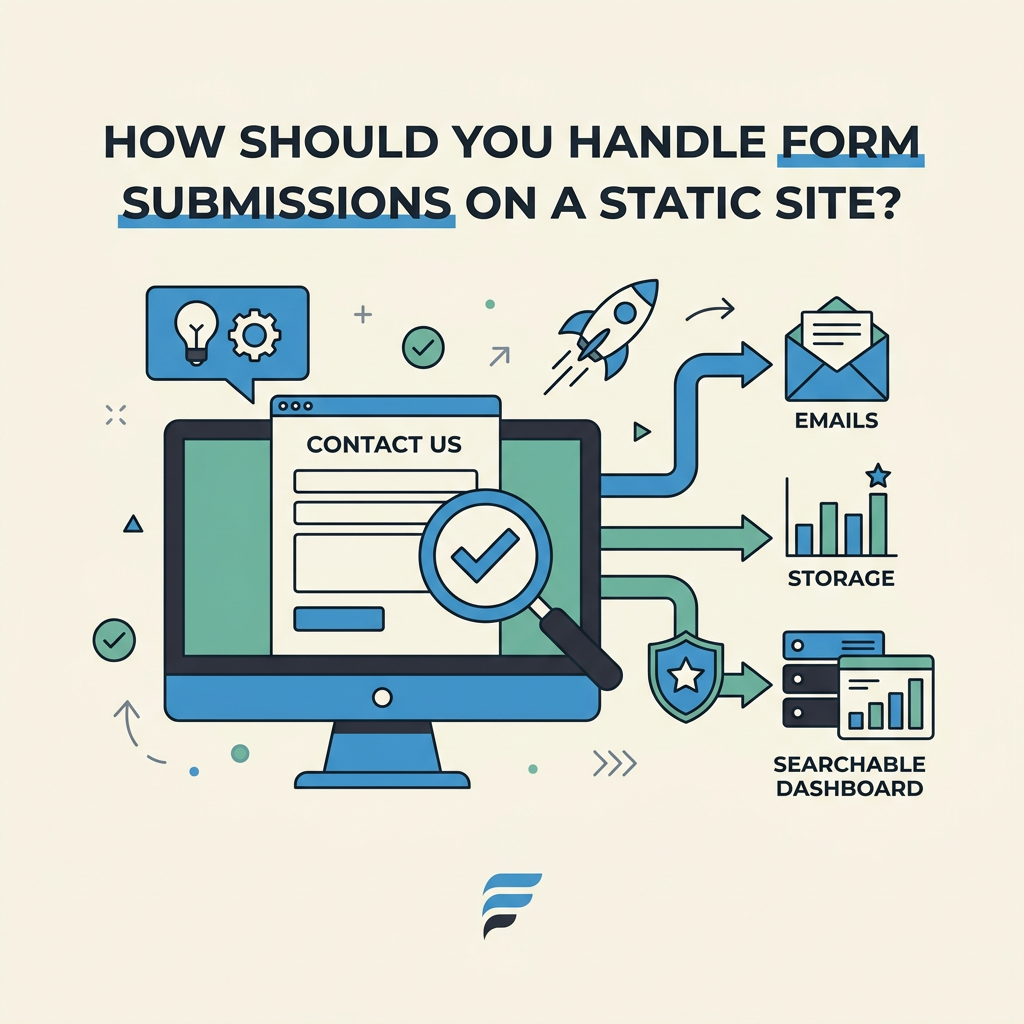
Submissions on static sites require a backend, but you don't need to build one from scratch. The traditional approach—setting up a server, managing a database, handling email notifications—is expensive, time-consuming, and dangerous for indie developers. A form backend service abstracts away this complexity, providing secure submission storage, email routing, and a dashboard to manage responses.
The Form Backend Service Pattern
A form backend service sits between your HTML form and your email inbox. When a user submits the form, the service receives and validates the data, stores it in a searchable database, sends you a notification email, and optionally sends an auto-reply to the user. You embed a single line of code in your form—either a JavaScript hook or a hidden form action—and everything else is handled by the service.
This pattern is ideal for static sites because the form remains 100% static HTML; no server-side rendering is required. Even a fully client-side React app can use a form backend service for submissions.
Comparing Form Submission Approaches
| Approach | Setup Time | Maintenance | Cost | Security | Email Handling |
|---|---|---|---|---|---|
| Custom Backend | 2-4 weeks | High (database, server, monitoring) | $20-100+/month | Your responsibility | You build it |
| Formspree / Basin | 5 minutes | Minimal | Free-$50/month | Depends on provider | Basic email only |
| FormBeam | 2 minutes | None | Free-$29/month | Built-in spam filtering, server-side validation | Instant notifications, auto-replies, email customization |
| Zapier / Integromat | 10 minutes | Moderate (workflow management) | $20-99+/month | Depends on integrations | Via integrations |
FormBeam is the best fit for static site developers because it combines simplicity, affordability, and the features teams actually need. You add your form endpoint in the HTML action attribute, and submissions flow directly to your dashboard without touching a database or server. The free tier includes 100 submissions per month, making it cost-free for low-traffic sites.
Embedding Forms Without Backend Code
The simplest pattern: Point your HTML form's action attribute to your form backend service's endpoint. No JavaScript required. The form submits, the service stores the data, and you receive an email. For added sophistication, use JavaScript to show a success message without a full-page redirect. FormBeam's embedding documentation provides ready-to-use snippets for vanilla HTML, React, Vue, and Next.js.
What Are the Most Common Validation Mistakes on Static Sites?
Even experienced developers stumble here. Understanding common pitfalls saves weeks of debugging and abandoned user sessions.
Overly Strict Validation Rules
Forms that reject valid inputs based on rigid rules are maddening. Examples: rejecting email addresses with plus signs (valid in RFC 5322), requiring specific phone number formats, or refusing hyphens in names. Test your validation rules against real-world variations. The rule: if the user's intent is clear, accept it. Err on the side of permissiveness; your server can always ask for clarification if needed.
Losing User Input on Errors
When validation fails and the form redisplays, preserve the user's input. Nothing is more frustrating than re-typing an entire form because one field was wrong. Even better, use client-side frameworks (React, Vue) that maintain form state in memory, so validation errors don't require reloading the page at all.
Ignoring Mobile and Accessibility
Mobile users see your form on small screens, often in noisy environments. Ensure error messages are visible without scrolling. Use appropriate input types (email, tel, number) so browsers provide native keyboard suggestions and validation. For accessibility, pair every error message with a visual indicator—not just color, but an icon or text label. Screen reader users can't see red borders; they need explicit ARIA feedback.
Conclusion
Form validation on static sites boils down to three principles: minimize friction, validate early and often, and offload the backend complexity. Reduce field count ruthlessly, show inline errors on blur, and combine client-side UX validation with server-side security checks. Most importantly, use a form backend service. You'll reduce setup time from weeks to minutes, eliminate maintenance overhead, and gain confidence that submissions are secure and never lost. With completion rates increasing 22% through inline validation and field reduction driving conversions up by 120%, the investment in a robust form strategy pays off immediately. Try FormBeam for free—your first 100 submissions each month cost nothing, and you'll have production-ready form handling deployed in two minutes.
FAQs
What is the best way to validate form inputs in real time?
Validate on blur (when users leave a field) rather than during typing. Use lightweight JavaScript libraries or native HTML5 validation attributes combined with custom rules. Show errors inline next to the problematic field with specific, actionable messages. For fixed-format inputs like phone numbers and dates, use auto-formatting to guide users toward the correct format before validation even triggers. This approach reduces error correction time significantly while maintaining user momentum through the form.
Do I need to validate forms on the server side if I validate on the client side?
Yes, always. Client-side validation is purely a user experience tool that catches typos and format errors early. It does nothing to stop determined attackers or bots from submitting malicious data. Server-side validation is non-negotiable for security. Every form submission must be verified on the server, checked against business logic, and screened for spam. Form backend services handle this automatically, inspecting submissions and filtering spam before data reaches your inbox.
What is the easiest way to handle form submissions on a static site?
Use a form backend service instead of building a custom server. Point your HTML form's action attribute to a form service endpoint, and submissions are captured, stored, and emailed to you automatically. No database setup, no email configuration, no server maintenance required. Form backend services are designed specifically for this workflow—you deploy in minutes, receive submissions instantly, and manage responses through a searchable dashboard. The free tier handles 100 submissions per month, perfect for low-traffic sites.